
What really happens when you hit the ‘Calculate fastest roundtrip’-button in OptiMap? The problem we attempt to solve is a classic and is called the ‘Travelling Salesman Problem’ or simply TSP.
Before we dive into this intrigueing question, some definitions are useful. Each location will be referred to as a node, with location number  denoted
  . There are
  nodes in total. The trip between a pair of nodes is called an edge, and the trip from node
  to
to  is denoted
  . The full set of nodes and edges is called a graph and is denoted
 .
.
We note that in the context of driving directions, there is either a way to go from each node to all of the other nodes, or there is no way to reach that node at all. We will assume that there is a way to reach all the nodes, otherwise there would be no solution at all. For ease of notation, we say that the time it takes to traverse an edge is  .
.
Another characteristic of the problem we try to solve is that the time associated with an edge is not necessarily equal to the time associated with its reverse edge. This is the result of for instance one-way streets and that it’s easier to turn right than left at an intersection. Thus, our graph is directed.
The first part of solving the problem is defining it. We seek to find an ordering of the nodes, starting and ending at node 1, that visits each location exactly once. This ordering should minimize the total time it takes to traverse.
There are  possible roundtrips that visits each location exactly once. Evaluating each possible roundtrip, a so-called brute-force approach gets infeasible between 10 to 20 nodes, depending on your patience and hardware. Actually, all known methods of finding the optimal solution use resources exponential in
  .
.
With 9 or less nodes, it is feasible to write code in JavaScript. So in this case, you get the optimal roundtrip.
If we’re willing to settle for near-optimal solutions, a number of methods are available. These are called heuristic methods. The simplest of these methods is to always travel to the unvisited node that is closest to the one you’re currently at. This method is referred to as ‘Greedy’ in the performance results below.
There are better methods. ‘Ant Colony Optimization’ is one of them. Inspired by the way ants find food in nature, this method uses a swarm of ants, each of which is fairly dumb, to find an intelligent overall solution. Real ants leave pheromone trails when they walk. They can also smell these trails. If an ant finds food close to the ant colony, this trail will be traversed faster than the others and have a stronger smell, because the pheromone dissipates over time.
By letting virtual ants walk randomly around in the graph, we get roundtrips. The ant roundtrips are evaluated by the time they took to complete, with faster roundtrips being assigned a stronger smell. An important question is how the virtual ants choose which nodes to visit next. Probabilities are assigned to each edge going to an unvisited node, depending on its assigned time and how smelly it is:
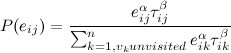
Here,  is the smell assigned to edge
  . The ants pick edges according to these probabilites. The constants
  and
and  can be used to fine-tune the performance of the ant method.
Another trick which is called k2-opting is used when an ant has completed its roundtrip. We pick two edges of the tour, and see if the edges can be swapped to create a better tour.
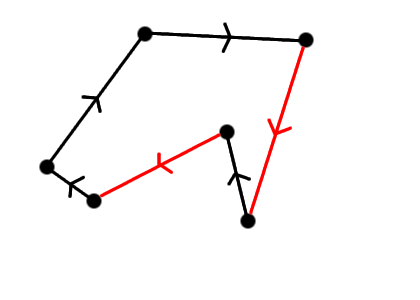
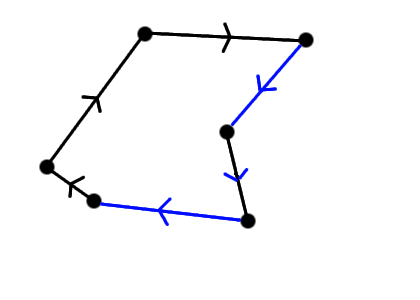
The k2-opting procedure is repeated until no two edges can be swapped to create a faster roundtrip. k2-opting is a cheap way of improving many TSP heuristics.
Performance:
| Test Case | Optimal Solution | Greedy | ACO | ACO k2-opt |
| n = 10 | 28 167 | 34 011 | 28 563 | 28 167 |
| n = 11 | 28 294 | 29 758 | 29 542 | 28 294 |
| n = 8 | 25 310 | 26 515 | 25 310 | 25 310 |
| n = 12 | 36 204 | 41 211 | 39 404 | 36 204 |
| n = 12 (Paris) | 11 141 | 12 705 | 12 062 | 11 141 |
| n = 12 (Berlin) | 10 570 | 11 429 | 11 789 | 10 570 |
| n = 12 (N.Y) | 7 608 | 8 714 | 8 361 | 7 608 |
| n = 12 (London) | 4 729 | 4 845 | 5 220 | 4 729 |
The numbers are in seconds. The ACO column is with 30 ants and 30 waves, the k2-opt ACO column is with 10 ants and 10 waves, to make up for the extra computation needed to do the rewiring. The results suggest that the current method should find roundtrips very close to the optimal.
Pingback: nearby.org.uk blog » Blog Archive » 8 out of 10 Travelling Salesmen use this map…
Excellent! I’ve been trying to develop something like this, but alas, without a degree in Mathematics, I couldn’t. Any chance of you releasing the code 🙂 I have a site in development that could take the web by storm if this application was included.
An excellent work. I guess VRP implementation will be your next move? Do you think that this project is appropriate to be a final year project for a non-CS student?
Hi,
My question to you relates to Gmaps API group discussion threads titled “Mapping multiple destinations/drivetimes and finding the best routes”, with the URL:
http://groups.google.com/group/Google-Maps-API/browse_thread/thread/1c06b074b61e8b5/f45141eb5fe579cd?q=%22optimal+route%22&rnum=5&lnk=sbp#f45141eb5fe579c
In particular regarding Mike’s posts saying
“You’re not currently allowed to automate the routing from Google, so you’d have to make those 55 requests manually.”
and in the next post on the same page “The Google route finder only plots routes from X to Y, not X to Y via some intermediate points. All you need to do is to sum the durations of the chosen segments.”
I wish to ask you how then it’s possible to apply Optimap or its enhancements -when this is assumed to be true- with which you can create an optimal loop for up to 9 cities, as you mention. Is there a restriction to develop this on the part of Google?
can, for example, routes from a fixed startpoint to possible connection points be compared and the nearest point with distance infos be displayed, followed by suboptimal, farther points?
if everything with further improvement on your map were ok and feasible (is it?) how far are we from delpoyment of multiple route evaluation for large number of points and routes?
thank you very much for all your information,
best greetings,
berat
Hi Berat,
I read the Google Maps API terms (http://www.google.com/apis/maps/terms.html) fairly well when I signed up, and I read them again today. There does not seem to be anything in there that prohibits my TSP solver.
The 55 requests (actually 110, since the trip from A to B is not always the exact opposite of the trip from B to A) are well within the limit of the 50,000 geocode requests that Google allows daily. This request limit might be a problem if you want to find routings for a large number of points, since you need to know all pairs of distances, i.e for 200 cities, you need to make about 40,000 requests.
Another limitation is that your application has to be publicly available to anyone free of charge. If you intend to use this application for your business, to schedule your deliveries (or whatever), you need to be aware that anyone can use up your daily quota of requests, and then you might not be able to use it for yourself!
The algorithm I use for more than 9 points delivers a solution that is usually very close to optimal. This algorithm can easily handle 200 points, but the request limit will not handle it. This is why I restrict my solver to 20 points.
I do not know how Google’s internal systems work, but I would think that there is little stopping them from making optimal routing for a small number of destinations (say 9) publicly available in the official Google map application.
To answer your last question, the Google daily request limit and the requirement that the application be publicly available without charge, makes multiple route evaluation for large number of points impossible with Google Maps API. Sorry for that.
-Geir
Hi Geir !
in case you are interested in doing custom programming for a austrian company then please get in touch with me so I can provide you with the details.
hubertus hiden org
Many Thanks,
Hubertus
Hi Geir
May I congratulate you on a great app.
I’m in the UK and wondered how I could get your app working with UK postcodes. eg try typing in MK18 1BP or MK18 1BP, UK and it doesn’t work. but these (like all other UK postcodes) work well on google maps normally.
any help or guidance would be much appreciated
thanks
Tim
Hi,
To answer Tim’s query, this is due to a change in the way Google geocodes UK postcodes which happened last week. Currently it only looks at the first half of the postcode so isn’t very useful. See the thread below for more details:
http://groups.google.com/group/Google-Maps-API/browse_thread/thread/c8808fb120f128e2
I am trying to call Optimap from another webpage using the syntax below but don’t get offered the Calculate Route option:
http://gebweb.net/optimap/index.php?loc0=Fairmeadow,%20Winslow,%20MK18&loc1=Leckhampstead%20Road,%20Akeley,%20Buckingham,%20Buckinghamshire&loc2=St.%20Michaels%20Way,%20Steeple%20Claydon&loc3=Verney%20Farm%20Close,%20East%20Claydon,%20MK18
Can you advise what I am doing wrong ?
Many thanks and great app!
Lucy
The calculate route option should not be displayed, since the route should automatically calculate when called like that.
When I click the link you posted above, I do get the right route calculated right away. Can you post some more info about your browser / java script error messages etc.?
Best regards,
Geir
Hi Geir,
Thanks for the response, apologies for the delay on my side. I am using ie version 7. The javascript error is line 262 char 3 dur…[].0 is null or not an object.
regards
Lucy
Hi again Lucy,
I think I’ve resolved the issue. It would nice if you could try it again and confirm this (be sure to shift-click your browser’s refresh button to make sure it loads the new files).
Geir
Hello,
When I fill in 4 targets 1,2,3,4, you promise to return the optimal result. But the result gives me a trip 1-2-3-4-1, even if 1-3-2-4-1 is shorter and faster (I compared it by putting 1-3-2-1 in this order into your tool).
This means that google calculates the optimal rout for 1-2-3-4-1, but your tool does not calculate changed orders.
Is this a bug?
Yes, there was a bug that made it not compute anything… Embarassing!
Great work! Just a few days ago I was talking about this with a friend… and as usual, once I started digging for more info, I found your site.
Really cool! Thanks for explaining how you got it working.
Great! Now, for the holidays, I wish the user interface could allow:
start/end: (home address)
places:
best buy
radio shack
sears
target
safeway
Then, dump the instructions into a multiple destination google maps page.
Thanks again!
Holiday shopping routing is certainly a possibility (I’ve used the solver for that purpose myself). I’m probably not going to implement what you’re describing myself, but others are now encouraged to find new uses for the code and implement those themselves. The code is now open source!
A very good tool! Could it be extended to work with different beginning and end locations for a journey? Here are a couple situations where this could be useful.
1. Say I go to the office and pick up destinations I have to visit that day but after my last stop, instead of going back to the office, I go home.
2. Another case is where I initially have the same beginning and end locations for a journey but after making some initial stops, some later stops become canceled. It would be nice if you could then re-compute a new route from my current stop location to the end location that takes into account the changes that result from stop cancellations.
Thanks.
I was looking at your code and was wondering 2 things:
1) How hard would it be to include it on my own page so as not to hammer your API key and servers? (eg what would I need set up)
2) I noticed you had a carpool function (I assume it does an open TSP), how could I go about using that?
By the way, great work on the problem. I wrote one of these in Perl a few years back for a CS class, and the algorithms are quite a challenge.
Hi, I second the previous comment about different starting and ending points. This is a related problem to TSP. A minimum Hamiltonian path allows TSP as a special case. i.e. where the cycle is closed. It would be useful tho have two possible scenarios. a) starting and ending points are pre-selected. b) starting and ending points are let to emerge.
Hi. That’s properly an ace little application you’ve written. Would there be any way of making it so that you had an a->z route, with way points along the way which could be in any order? The idea being for pickups on the way somewhere (gigs in our case), deciding which route is quickest order to pick everyone up in, before going to the gig. That would be really ace.
Cheers for the app- you’re a legend!
m
A few of you have asked about different start and end locations. This functionality is now available if you hit the ‘Calculate Fastest A-Z route’-button. Also, I’ve upped the limit on the number of locations from 20 to 24.
Olá
Quais os arquivos necessários para colocar no meu site.
Não estou conseguindo reproduzir o index.php
Obrigado
Hello
What the files needed to put on my site.
I am not getting the play index.php
Thank you
Olá
Coloquei o directions-export.js , tsp.js, index.php e o import.php no site, o index.php está funcionando ok, mais o import.php não está funcionando.
http://www.zlink.com.br/optimap/index.php?&loc0=-7.1209077392192785,-34.9075984954834&loc1=-7.121418750873643,-34.903221130371094&loc2=-7.128828355854018,-34.93025779724121
Eu pergunto, preciso colocar mais algum arquivo ou alguma outra funcionalidade no meu site para o import.php funcionar correto.
Grato.
Correção:
O index.php e o import.php estão funcionando, mais quando eu disparo o link abaixo, o index.php não mostra os pontos. Eu pergunto, preciso colocar algum outro arquivo no meu site.
http://www.zlink.com.br/optimap/index.php?&loc0=-7.1209077392192785,-34.9075984954834&loc1=-7.121418750873643,-34.903221130371094&loc2=-7.128828355854018,-34.93025779724121
Hi, Geir, congratulations, this tool is excelent! I´m from Brazil and the last time I used the optimap there was an option to copy up to 20 lat, long at once. Now, I couldn´t find it despite the anounce made that is possible to route 24 points. The option is still avaiable?
Thanks a lot. Mariana.
Oi Mariana
Veja como usar no link abaixo, tem vários exemplos.
http://gebweb.net/blogpost/2007/08/26/optimize-your-trips/
Ricardo
Mariana, the functionality to copy many latitude, longitude coordinates at once is back. Click on the link labeled ‘Bulk Add by Latitude, Longitude’ and then paste your coordinates into the solver. When the results are computed, you have an option to show the raw coordinates of the optimal path right above the driving directions.
Geir,
This is a very impressive application of the TSP. I was wondering if you thought it could be adapted for the Orienteering Problem (OP), aka the Selective TSP, where the salesperson doesn’t have to visit every point, but needs to be back at base in a certain time, having maximised the value of the trip. Each point would have a differing value.
The reason I ask is I’m currently studying if it’s possible to come up with an optimum route for real life orienteering races, where racers have a set time to maximise their score. This would be a fun addition to post-race discussion, where the winners could compare their actual route with the theoretical optimum route, hopefully learning from the process.
I may have a go at tweaking your Javascript, e.g. to use a standard “running pace” for the duration, rather than Google’s GDirection durations. But I was wondering if you had any thought on how easy it would be to adapt OptiMap for the OP.
Thanks,
Ollie
Hi Ollie,
I was an active orienteering runner for 10+ years – that’s why I’m a maps-person 🙂 Not that many races actually allow you to pick some points to visits and some not, or even just re-arrange the order of your trip (provided they use e-timing).
My first intuition is that the problem will yield relatively well to Ant-Colony Optimization, even though I haven’t tried it. The harder part is the forest part. Google Maps doesn’t give you directions in forests 🙁 It does provide walking directions these days (launched last week: for trips of distance 10 km, there will be a link to show walking directions instead of driving directions). I haven’t checked whether it’s available in the API yet…
Assuming you have boring forests without too many large impassable obstacles (not the kind we have in Norway), you can grab the distance between the points and assume constant speed of the runner. I don’t think this application will be too interesting before we get orienteering-precision maps in Google Maps, though.
Very cool, Geir! A question and two wish-list suggestions:
1) I have noticed that if the user copies in more than the threshhold of 9 locations, so the heuristic algorithm is triggered, different runs of the application will produce different routes. (I understand that any given route is not guaranteed to be optimal, but I don’t understand the random behavior.) Could you explain that for the mathematically challenged?
2) If you were to add generalized functionality for an optional string label, perhaps delimited by parenthesis, to each line of the bulk-load
Apologies. My post got truncated. Here is the rest:
2) If you were to add generalized functionality for an optional string label, perhaps delimited by parenthesis, to each line of the bulk-load coordinates, that would be hugely useful in the result.
3) The ability to print or copy just the map window after panning/zooming would be great. Some routes need multiple graphics of small areas to illustrate them.
I tried to upload a coordinates list, but without success. Probably becaus I run on linux, which does not send a \n between the lines?
Hi,
Does this work for any location, we have similar requirement for a site in India. Can we use this for India?
Thanks
Arun
Neat Tool, it really works, but I do have a question: Is it possible to upload an itinerary and download the revised itinerary to i.e. a Tomtom, because it is not quite clear what to do with the end-results.
It’s not possible to download directly to Tomtom. I would usually just print the instructions (since I don’t have a GPS). You can try to click the “toggle raw path output” button and copy the latitude, longitude pairs to your GPS unit, but since I don’t own one, I haven’t tried it.
Nice tool to use for geocaching trips. But I noticed it only use routes used by car. In cities I like to use it for the best route on foot.
Is there a way to calculate this?
I’ve just added options for walking directions and avoid highways to OptiMap. The Google Maps API team added walking directions support last week, so this should be one of the first API sites that use them! It’s one of the more requested features for Optimap, so I know there are some happy OptiMappers out there now 🙂 I’m certainly one of them, since I don’t have a car and do virtually all my travel on foot / bike. Now when can we get biking directions in the Google Maps API?
Thanks a lot.
It works very well.
I do have a problem getting a route calculated by adding coordiantes in the “Add by bulk …” section.
After entering the programm won’t calculate a route.
I use the following format: N 51° 48.735 E 005° 14.603
I’d like to get a one time solution leaving from Pueblo, Colorado to all the county seats in Colorado. Would it be possible for you to do this and email me the order? Then I can put it in Google maps. (There are 64 counties.)
Thanks
This is a very valuable tool. Thank you!
One curiousity however. When I include 13 points in the URL, your site makes its calculations and provides the routing and trip summary. When I submit the same 13 points (highlight the url and enter), it recalculates and frequently determines a different route and total trip distance. The differences are a little over 1% in the instances I’ve tried and granted thats within my tolerances but shouldn’t your formulas always return the same values given the same inputs?
Regards,
Mike
Hi Mike.
If you enter more than 9 locations, you get a near-optimal solution. This solution is usually “good enough” for practical purposes. Because of the ant colony optimization technique, which uses random numbers, you can get different solutions on the same input.
I am attempting to write a C# program to be able to “scrape” the trip duration and trip length from an optimized route. However, when I execute an HTTPGET request for a url like:
http://gebweb.net/optimap/index.php?loc0=3166%20Diablo%20Avenue%20Hayward%20CA&loc1=3000%20Sand%20Hill%20Rd.%20Menlo%20Park%20CA&loc2=4440%20El%20Camino%20Real%20Los%20Altos%20CA&loc3=321%20East%20Evelyn%20Ave%20Mountain%20View%20CA
the program just gets the main OptiMap page without the script being executed and therefore the program doesn’t have access to the final output.
Can you offrer any suggesions as to whether it is possible to access this information from a non-browser application?
Thanks.
I get a javascript alert(“604”), When adding points in Dubai, UAE. Does this mean that the roads in Dubai are not incorporated in GMaps yet?
Elsewhere, it works fantastic. Awesome.
Thanks,
Michael
Great app.
One thing I noticed. When Calculationg A-Z, the end point listed in the directions is always incorrect.
For example, add the following zips: 95691, 95624, 94550 and Click Fastest A-Z.
The map will display correctly, but the end point in the directions does not match the end point on the map.
Bug?
Hi Chris,
Yes, you found a bug! I’ve fixed it now, but in the past, A-Z directions would always display the address of the second-last added address (or the lat, lng of the last point, if no address was added). Thanks for letting me know!
Geir
Geir,
A feature request if I may: the ability to change and/or delete entered points.
Here in my corner of Pennsylvania (Pittsburgh), there are a number of places that have the same names (for example, there is a Sewickley borough or township in each of at least four of the surrounding counties…), and sometimes it takes a little fiddling with the input to get Google to pick the right one. So, it’d be nice to be able to remove the ones that Google picks wrong & try again.
Thanks!
Hi! I don’t understand well – Why we can’t use ACO for all 24 locations? Does it call GDirections for every intermediate result? And what do you think about branch-and-bound principle for solving TSP?
Best regards!
Hi! Perfect app. …
One thing that I noticed.
When I click on the marker to remove it from the calculated route it gets removed, but when I press the Calculate… button again, I’ll get the same route and all removed markers reappears.
Would be great, if we could update the route with removing markers not only with adding them or starting over.
Best regards!
Hi Geir,
great super application ! This rocks !
Something I’m wondering about :
how hard would it be to add and extra constraint to the optimal route function, to take into account opening hours of locations.
This would be perfect for a holiday trip (musea, etc..).
Greets,
Tom
When I enter a zip or address and click on Add, it does not add the pin to the map. This was working before.
Hi Chris,
I’ve updated the add function to also center the map on the pin again. Please give it a try again and let me know if the problem is still there.
Hi Geir,
thanks a lot for this powerful app!
i was looking for a long time for something similar!
i have to make deliveries by bike, i noticed if not selecting the walking option gives a 604 error with all browsers (ff iron opera ie), when selecting walking many times it gives you directions against traffic, you know when biking across traffic you must go much slower… so could you please fix it?
do you have any plans to up the limit from 24 to 60 or so?
to add any constraints?
thanks a lot
Michael
btw
i tried printing with latest install of ff iron opera and ff was the best one, opera lacked the blue line of route and iron has not got transparency right.
Geir,
The clickedAddAddress function is now working again. Thanks!
Hi!
Great tool!
What I’m doing wrong – first I tried to paste 134 addresses into the bulk add -> only 7 addresses were added. Then I tried like 15 -> only 3 added.
Help!
Regards, Gerald
Hi.
I would love to see this in a Mathematica notebook.
Please contact me so we can turn this powerful source into a even more powerful application.
Is the 24 locations limit a google limit? or a processing limit?
I don’t see any response to Mike M’s November 7th, 2008 post. We’re trying to do something very similar. Has anyone had any luck writing a C# program (or other server side app) to be able to “scrape” the trip duration and trip length? We’d like to be able to cache distances from various set points so we know the closest spots to include on a map once the selections are made. Has anyone had luck doing server side screen scrapes to get the mileage info? Anyone have samples they’d be willing to share? Thanks if so!
Can you please share the BpTspSolver.js , directions-export.js files too. I would like to go through these two files.
Please help me. Thanking yo in advance
Terrific site! I love using it for routing jobs trying to determine the best path for trips. Keep up the excellent work and attentive support!
Not working for me, gives a 604 error code with the pop-up.
The 604 error is returned by Google Maps if the directions request for one of the points you entered fails. Could be a point is added too far from a road, or an address that isn’t recognized. Not much I can do about that, except maybe spitting out a more readable error message…
Beautiful Gebweb! I am currently trying to use it in my databases applications. Is there any chance to get just the trip length back? I was trying to find it in the resulting code but did not.
Any help would be great ! Thanks and keep on with this !!!
Why 30 ants in 30 waves? Isn’t that equivilent to sending out 900 ants?
Are you only updating the pheromone after each wave (using the best tour of each wave)?
… just curious.
Also see: http://github.com/philtomson/ACO/tree/pop_based
for a population-based ACO implementation. Pop-based is a bit simpler: we replace the global evaporation phase with a population of tours in a FIFO. As tours enter the FIFO edges are incremented as they leave they’re decremented – so essentially the pheromone on a tour-edge “evaporates” when that tour leaves the fifo. Also try to use integer math as much as possible in the pop-based ACO so that it will be easier to implement in hardware (FPGA), but that should also improve performance on a CPU as well.
I sent the following addresses, which were assigned to one of our Building Inspectors today (we are in Everett, WA USA) to the Optimap site and ended up with directions that included \”kayak across the Pacific Ocean\”, and ending up in China via Hawaii and Japan. Is there something wrong with my formatting? Any suggestions for getting more reasonable results?
http://gebweb.net/optimap/index.php?loc0=3000%20Rockefeller%20Avenue,%2098201&loc1=3612%20183RD%20LN%20SE%2098012&loc2=3612%20183RD%20LN%20SE%2098012&loc3=3717%20224TH%20ST%20SE%2098021&loc4=3721%20224TH%20ST%20SE%2098021&loc5=4207%20143RD%20PL%20SE%2098296&loc6=4207%20143RD%20PL%20SE%2098296&loc7=4201%20143RD%20PL%20SE%2098296&loc8=16419%202ND%20PARK%20SE%2098012&loc9=1324%20159TH%20PL%20SW%2098087&loc10=15930%2014TH%20AVE%20W%2098087&loc11=1301%20158TH%20PL%20SW%2098087&loc12=1303%20158TH%20PL%20SW%2098087&loc13=3620%20224TH%20ST%20SE%2098021&loc14=22307%2037TH%20AVE%20SE%2098021&loc15=22307%2037TH%20AVE%20SE%2098021&loc16=22307%2037TH%20AVE%20SE%2098021&loc17=123%20195TH%20PL%20SW%2098012&loc18=13924%2015TH%20PL%20W%2098037&loc19=18727%203RD%20AVE%20W%2098012
Hi, just wanted to congratulate you on a fine bit of coding. I looked in the source and it’s very impressive, especially considering the tools available for coding JavaScript. Thank you for making this available.
Nathan
Thank you, just used this to map a business trip to visit 11 of our restaurants in the Phoenix, AZ area. You saved me a bunch of time!!!
Gier,
This is so wonderful! I’d love to be able to display a name rather than the lat/long on the output page. So instead of it saying “34.756658,-92.44785” it could say “Burger King” (or my text of choice). Perhaps it could be added as an input on the query string, like:
http://gebweb.net/optimap/index.php?loc0=34.756658,-92.44785&name0=BurgerKing&loc1=34.754084,-92.420194&name1=McDonalds
This would really make it helpful when directions are printed out.
Jeremy
Hi Jeremy,
This is a useful idea! I’ve implemented this as an optional parameter to the query string, just like you suggested. This should now work:
http://gebweb.net/optimap/index.php?loc0=34.756658,-92.44785&name0=BurgerKing&loc1=34.754084,-92.420194&name1=McDonalds
Geir
That is FANTASTIC, and the addition of the names make the output really helpful.
Hi!
The “Add list of locations” button does not work in FireFox.
Why?
Gerald
This is a very impressive implementation, thank you.
Is there a way we can pass URL parameters to specify the map size? A bigger map would be more useful. Also, you appear to be using an older version of the google map… would your implementation work with the newest one (with zoom bar, etc.)?
Ah, disregard my second question… I see you are using the map I was referring to. Not sure what I was seeing before!
This is great!! Is it also possible to add the management of several concurrent vehicles? I had seen something similar on http://apps.viamente.com/demo/ but I soon realized it’s a commercial service. Thanks to the open source!
AHHH…i thought this was going to be awesome. i put several locations in and the map works great…..BUT, when i tried to send to TOMTOM there was a problem. the tomtom tech support tried for 40 min to help but with no luck. the route IS going to my tomtom ONE, however, it is either going to an incorrect subdirectory OR is has formatting issues….can you help?
Load of rubbish! this has only worked once for me. I have spent ages putting in addresses and as soon as I click round trip it just says error 602 or 604. I am only putting in 20 addresses each time too
Are you currently selling or licensing the optimap code so it can be hosted on another location?
What is the best way to add addresses? With a comma after each address etc etc?
The best way is to use the “bulk add by address” link, and add one address per line.
Hope this helps!
Hello. Awesome work! I have a problem in scale of points that need to be routed. We have an operation about 5 times a year that requires hitting our full inventory of bus stops (4000+) and even breaking that up into 4 vehicles workload it is a daunting task to make this work effeciently. I am looking for a technical solution to partitioning uot this workload.
We also have an inspection process where the inventory is broken up by service tiers with equal complexity. Do you have any ideas or suggestions on what I could use to address this problem?
How can I use characters like ä when I’m preparing the string used by your script?
Thank you
An excellent work. I guess VRP implementation will be your next move? Do you think that this project is appropriate to be a final year project for a non-CS student?
Hi! Cool stuff!
I have a question: On your site (http://www.gebweb.net/optimap/) you say that the solver is available under the Common Public licence now (tsp.js) – is that true for the file BpTspSolver.js as well?
Without it, it does not work, right?!
Thanks, Marc
Hi Marc,
I have updated the text to say that the solver code is available under the MIT licence at http://code.google.com/p/google-maps-tsp-solver/ . This includes both tsp.js and BpTspSolver.js. If you make changes to the code, which you believe are useful, please consider updating the code repository 🙂
Also, I set up a mailing group if you want to track any changes to the code. You can subscribe here: http://groups.google.com/group/google-maps-tsp-solver
Geir
I read your behind-the-scenes explanation of the Optimap and I must express that you are providing a great tool for small businesses all over. I found out about your tool through a small business owner when he needed my coding expertise and I passed knowledge of this app to my supervisor. I hope this app lands you many more opportunities if it has not already.
Hi, I found this page via a link from wikipedia (TSP-article). Since I did some playing around with the Wolfram Mathematica demonstration notebook files regarding TSP-solving, which illustrate a lot of usefull insights for a first grip on this material quite nice, though somewhat static, I am wondering whether there would be any sane opportunities of solving the TSP of the following way points of a huge travel to asia that I’m planning throughout the next weeks and, if and then in which way one should/could incorporate the factors of visa regulations and “unforeseen incidents” within an attempt to solving it within mathematica – or however. Just let me illustrate this: My plan is to set out from Frankfurt/Germany, where I currently live and travel along an – in the wider sense – by TSP means OPTIMAL route, ideally also making use of the best possible airline and travel fares. I’m planning to do some [legal] volunteer work along and would like to encounter some great couchsurfing.com-related real life experiences 🙂 Perhaps providers of emergency roadside repair/roadside assistance services may have some great experience solving those kind of TSPs that I’m likely to run into – judging by general dynamics, visa/time windows, costs and all. Anyone betting on the power of mere intuition on solving this one?: THE ROUTE POINTS are, unless for Frankfurt/Germany as fixed starting point – in NO order at all, which is the route of this search for a route… -> Singapore; Bangkok; Manila; Ho Chi Minh; Angkor Wat; Phnom Penh; Taipeh; Seoul; Brisbane; Sydney; Adelaide; Melbourne Australia; Wellington; Christchurch/New Zealand; Tokyo. I would greately value any hints given to let me get a better idea of how to solve this enormously complex TSP. Thank you very much. Marc
hello geir!
first i want to congratulate you for a superb site.. its awesome…
i want to implement the same algorithms and methods to my website, which is in development for my undergraduate thesis…
i wonder why you chose Google Maps where you are restricted by the geocode request’s limitation of Gmaps Servers..?
Haven’t you considered other dynamic maps which you can incorporate too? like Open Street Map? see this link : http://www.openstreetmap.org/
Another thing is, does Google Maps charge you at any cost for using their API? I cant find pages that explain this…
i would be very grateful for your response….
Mabuhay!
I can’t load bulk addresses. Does this function? Do I have to load my addresses one by one?
Hi Geir, great applications.
Just another mathematical problem for you!! I’ve been trying to find a way to produce a route which will travel down both sides of a street in a suburb/town to deliver to all addresses. Its really a classic postal service route planner, garbage collection, newspaper delivery. I guess it would have to cope with left and right hand drive countries.
We are also trying persuade our local council to collect garbage from only one side of the road to reduce greenhouse gas emmissions from collection trucks. As always its “all too hard” from the council, but showing a reduced mileage map would be a great advantage.
Any thoughts.
Best regards.
Hello,
Great app! I have several locations (latitude and longitude) that I paste into the input box to get optimized route. What would I have to do to have an identifier show up on the pins on the map and the directions that would give a description of each latitude and longitude location.
Any help would be greatly appreciated!
Rick
GREAT WORK!
Thanks!
Geir, as everyone indicates the algorithm is impressive.
Would like to use it for something both general, yet limited ‘per trip’. For me what would be best is something that will allow one to:
1) Input all of the addresses(eg. even throughout the entire US) that one might be conceivably interested in(or, equivalently, the eg. ‘My Map’ that would have all of those addresses/points/markers)
2) Set a general(provisional reference) expected/planned route one intends to take ‘this time’
3) Set a distance(or time) limit/cutoff (eg. 30mi on either side of the chosen route), beyond which, the other markers wouldn’t be considered in doing a contact optimization.
4) Do a ‘priority ranking’ of the above 3 to have the program ‘know’ which is most important — for which to optimize from.
i) ‘Excluded’ address/markers would still show on the map
1] So that one wouldn’t have to continually make up another map — ie. the same map(if not subsequently edited for more or less points of interest) could be used for all ‘searches’
2] But, if desired, certain points could be highlighted as ‘special cases’, & ‘brought into'(or excluded from) the ‘contact circuit’
(eg. if it were more important to make the stop/contact, than stay on/within the tour route corridor.)
Is this possible?
Could it then be tailored for input into a GPS(as a lot of mappings are now being ‘ported over’ into a GPS (was told that the Garmin Nuvi could accept such)
Excuse, wanted to edit the previous comment, & couldn’t seem to delete/edit it. So..
Geir, as everyone indicates the algorithm is impressive.
Would like to use it for something both general, yet limited ‘per trip’. For me what would be best is something that will allow one to:
1) Input all of the addresses(eg. even throughout the entire US) that one might be conceivably interested in(or, equivalently, the eg. ‘My Map’ that would have all of those addresses/points/markers)
2) Set a general(provisional reference) expected/planned route one intends to take ‘this time’
3) Set a distance(or time) limit/cutoff (eg. 30mi on either side of the chosen route), beyond which, the other markers wouldn’t be considered in doing a contact optimization.
4) Do a ‘priority ranking’ of the above 3 to have the program ‘know’ which is most important — for which to optimize from.
i) ‘Excluded’ address/markers would still show on the map
1] So that one wouldn’t have to continually make up another map — ie. the same map(if not subsequently edited for more or less points of interest) could be used for all ‘searches’
2] But, if desired, certain points could be highlighted as ‘special cases’, & ‘brought into'(or excluded from) the ‘contact circuit’
(eg. if it were more important to make the stop/contact, than stay on/within the tour route corridor.)
Such ‘limitation'(even for a large number of initial ‘interest addresses’) should make the given calculation much simpler with a shorter ‘run time’; while retaining the same ‘backround’ for different alternative/subsequent entry/exit points.
Is this possible?
Could it then be tailored for input into a GPS(as a lot of mappings are now being ‘ported over’ into a GPS (was told that the Garmin Nuvi could accept such)
Excellent tool!
I’d like to ask if you’re working on an option of exporting the driving directions into a file or emailing them?
This way I can edit the file and print it the way I want/need and not as it’s shown on the web.
Is it possible that you have it and I missed it?
I’ve tried other tools, like viamente and myrouteonline which are good but require payment for these features.
Thanks! Much appreciated.
I have ported it to Maps API v3. Unfortunately, maxSize can be 10, instead of 24
hey man! awsome work! I have a question to as though! after using it several times for a 22 problem node now it keeps resulting in a 604 error window and stops woring! do you now what’s going wrong
Hello.
I Try this but i have pickup and delivery service.
Ejemplo:
from A to B
from C to D
From E to F
I optime the route and it’s says: A – C – F -D – B – E
If you see the sample, the point F in before E and in E y pickup and in F Delivery.
Do you have any solution?
Thanks
Unfortunately, there is no way to specify that point A has to be visited before B, C before D and E before F (extra restrictions) yet. This is something that I might add at a later time. The most difficult part is actually building a GUI that lets people specify such restrictions in an intuitive way.
Geir
Hi.
I tried your Optimap a couple of months ago without any problems.
But now it seems like Optimap isn’t able to geocode some locations ?
For example: “Ågerupvej 66, Ballerup” (in Denmark). For many of the locations it says: “Failed to geocode”.
I have tried Google maps without problems.
Hi Taz,
Nothing has changed with OptiMap the past couple of months. I suspect what is going on is that Google is rolling out their own data and using that instead of what they used to purchase from other data providers. In some cases, that data is not as good as the data they were using before. Also, note that the Google Maps API and maps.google.com use a different search algorithm and different data, so addresses may work in one but not the other :-/
Geir
Is it possible to export the optimized route as a gpx file ??
Thanks !
Can the results be sent to Google Maps so that I can use the Google navigator on my phone to direct me?
No, unfortunately, the results cannot be loaded onto the Google navigator app at this time, as it has no API for receiving destinations from outside the app.
Hey what happened to the Add to TomTom button on optimap… I use this app every day for work and without this button im lost!!!!
I can still click the ‘add to tomtom’ button and see an itinerary file
getting created. What happens when you are clicking the button? Can
you download the itinerary at all, or is it just in the wrong order?
Hi,
Do you have the facility to download maps to Tom Tom Start 20 which I believe uses my Tom Tom instead of Tom Tom Home?
Thanks
Alistair.
I used your program yesterday without any issue. Tonight I tried it again and it just calculates and calculates and never comes up with a solution. What may be wrong?
You are a godsend! Thank so very very much for this. I’m starting a new job where I have to go to multiple locations and was wondering how I would be able to figure out the best route and print driving directions. I had a conversation about this with a friend that I know with an interest in math. He told me about the salesman problem. I did a web search on that and it lead me to your site.
Hi Terrance,
Thanks for the kind words. I’m always curious to know how people are using OptiMap. Let me know if there’s anything I can change or add to make your day easier 🙂
Hi,
This is just brilliant. I was trying to find the proper algorithm to do the same thing for a project. The behind the scenes page puts everything just perfectly.
Could you help me with adding appointment times to the optimap. That is what I have to work on right now. To put it very concisely some nodes will have unavailable times listed as well and cannot be visited at those times. To finish my project I have to add that functionality. Could you help me or redirect me to some site where I could find a solution?
Thanks
Rohan
The problem you are trying to solve is called TSP with time windows (TSPTW). The algorithms used by optimap (in BpTspSolver.js) can be modified to handle the extra restrictions of time windows, but it is not trivial to do so. Depending on how many stops you are planning for, modify only the appropriate algorithm (tspBruteForce if 10 or less, tspDynamic if 15 or less, or tspAntColonyK2 if more).
Thanks for the help. Really appreciate it. Pointing out the js file with the code was a boon too.
Rohan
Hi, can anyone provide a working source of optimap with asp.net please.
Again nice work. hey any chance you could share the tomtom.php file with us all?
Pingback: Solving Traveling Salesman with Ant Colony Optimization in JavaScript
Pingback: Traveling Salesman Problem Ant Colony Optimization in JavaScript
This tool would be good if it actually read the address that is entered correctly. I have built 2 vending routes The tool says that one of my locations is about 8-10 miles from the actual location. That is just totally unacceptable for mapping out the route.
Trackback: eb5 investment visa
Hi geir. First of all, you have a wonderfull application. I have a small question for you. I’m currently developing an ANT TSP solver of my own which relies on the Google Maps API. I see that your app says it has a 100 destinations limit. My question to you is, how do you create your distance matrix?
A 100 destination problem would mean you need 100 * 100 – 100 elements in your distance matrix (we don’t need the elements on the matrix diagonal since they are all equal to 0). This is way above the Google limit of 2500 queries per day. How do you get around this problem?
Thank you!
Pingback: Route optimization for MWS410 with OptiMap « M3 ideas
Hello
I read the description above and also a comment that says that you use brute force if the number of nodes are less than 10, Dynamic tsp if nodes are less than 15 and 15 or more you use AntColonyK2 is it that the case?
@monopolis,
It’s not correct any more. If the number of nodes is less than 15, we use dynamic tsp which always yields an optimal solution, so there is no use for the brute force at all.
Hello ,
Really nice work . I would like to know how you calculate the distance between the nodes
Thanks in advance!
Hello! I was wondering what your privacy policy is? Will my addresses be saved, analyzed, sold, etc? Thanks!
The addresses are never even sent to my server. All the computation happens in JavaScript locally on your machine. The exception is that addresses have to be geocoded and distances computed by Google. So it is subject to the Google Maps API policies. But no info is seen or stored by my server.
Very very very nice app… would be very nice if we could save the routes …. i have a pool business and i need an app just just this one.
but wish i could use routes and save them
like.
technician 1 tech 2 tech 3 and so on.
Monday
Tuesday
wends.
thurs
fri
let me know if we can talk about maybe creating this functions for me and i can pay for it
Very popular Regarding Cheap Snapback A a very good way for more information on snapbacksite2013comment.If your family want an all in one risk – free as in that case as a multi function the answer variable head-gear, then you need for more information on people likely choose to go with going to be the low-cost snapback less difficult accessible in your markets today.
I cant get optimap to calculate. What am I doing wrong?
Being in the market for a house… I am interested in using this type of mapping to determine the best path between a number of open houses. The only addition I would need to figure out is some form of prioritization based on the times a given house is open.
Is there any way to use this tool in this fashion?
Brian
@Brian no, there is currently no support for specifying time windows (and durations) for each stop. These two features are the two next features I will add once I have some free time, but I’m running a startup company and just became a father, so it may take a while still…
Maybe I’m not seeing it, but some of my runs list distances in kilometers, others in miles.
I’m in the USA, and while I personally like the Metric system, my car’s odometer is in Miles.
Is there a toggle I missed?
a suggestion: why not to implement import from a personalised map of google engine? I have all my locations already stored on a personal map….
Hello, why not implement a url parameter that forces the optimization of the waypoint before the html is generated? I need to work on waypoint optimized but instead file_get_contents course …. can not supply them.
Did you look into using the OSRM instead? The code of the router is freely available, and so are the data. No more dependency on Google restrictions!
When I add more than 40 Points it takes very long time to get a solution, and if I add up to 60-70 Points I have been waiting for more than 30min without any result. Sould it work like that, or I’m doing something wrong?
Unfortunately, Google has recently started enforcing much more strict limits on directions lookups, so it will take a very long time to find the best routes when there are lots of destinations. Your situation is not uncommon.
Hi Geir,
I need to get LAT , LONG sequence of Optimized Route. Can you please tel How I can get that.
Thanks
There are still three more steps and many more guidelines on how to achieve this very daunting task.
They will not end up using the bathroom every time they go in there
but they will become familiar with the sensations associated
with using the toilet. A little boy might be very attached to his
mother and see his father as an intruder into this relationship,
for example.
This is absolutely amazing. Thank you for your genius here – the TSP is awful for us working guys, and this is a HUGE help. Thanks again!
I like the entire concept. If $ can help. Myself, plotting trips with strange routes in (MEP) is just annoying. You may Email the product details and price.
Hi,
Great tool, would it be possible to have a tick sheet of destinations ), tick the route off in order (Limited in number) then have the tool do it’s thing ?
Hi there, I found yyour web siute via Google whilst looking ffor a related matter, your web site got here up, itt looks good.
I have bookmarke it in my google bookmarks.
Hello there, just changed ino aware of your blog via Google,
and found that it is truly informative. I am gnna watch out for brussels.
I will be grateful if you continue this in future.
Numerous otuer folks will likely be benefited out
of your writing. Cheers!
These art creations make a huge impression on us by all the
following ways:. The best thing to do is research
the different companies in your area and online to find the best deal.
It takes little time to download contents from these websites and
also have printing options.
Trackback: no no hair removal ears
Your mode of tlling everything in this article is actually nice,
every one be ablpe to effortlessly understand it, Thanks a lot.
My site seo firm australia
This caffeine in black teea helps to sharpen ones mental focus and ability to concentrate.
By following this simple 4 step process on a daily consistant basus you woll be
ble to see quick weight loss results within a short 4-8
week time period. Total Network Inventory provides a
wide selection of advanced inventory management features.
What a stuff of un-ambiguity and preserveness of valuable knowledge concerning unpredicted feelings.
You can see a tiny of Anderson’s entire filmography.
The timing of the speech was a classic Jane maneuver as well making it during the funeral ceremony.
The beautiful place is draped in green and the picturesque
landscape here are amazing and out of the world.
The partners do through arrangements for their honeymoon holiday and in this their major focus is on the honeymoon location.
Trackback: ZQuiet Vs Cpap
For the ones who do not want to dive deep into the sea to discover the superb marine life,
Marine Biology Museum is an apt spot for feasting the eyes on remarkable
creatures of the sea. Visitors can loosen up at its immaculate beaches and
enjoy the dulcet stroll amid the unparalleled natural splendour.
9) Mount Harriet place was the summer headquarters of the
Chief Commissioner of the British Raj and has a wonder view
of the outer islands and the sea.
Wonderful website you have here but I was wanting to know if you knew
of any message boards that cover the same topics talked about here?
I’d really like to be a part of community where I can get feedback from
other knowledgeable individuals that share the same
interest. If you have any suggestions, please let me know.
Thank you!
Hi Geir,
Great App!
I use this to route my stops in order to deliver heating oil by truck. The “Bulk add by address” and “export” features save lots of time because I can copy and paste from a database and do not have to manually enter the addresses into my GPS. (I use an old TomTom XL)
I can route well with a map but this does it quicker. This routes with loops the same way I would do. (Some apps go back and forth off a main road rather than stay to one side of the main road than the other on the way back.)
Here in the U.S., trucks are not allowed on Parkways so if one figures out how to avoid these specific roads in the route options, some routes could be better. If I owned the company, I possibly would pay someone to look at the code and do this.
Thanks Much for the work you put into this!
Hello Geir,
Is it the route lookups for each pair of destinations that takes the largest amount of time when approaching ~50 cities?
If so, have you considered using the Distance Matrix API and will this be added in the near future, or should I attempt to refactor the code myself (and of course push to the repository if i succeed!) ?
Hi i use your site to work out my courier route, but have never been able to use the function “upload to Tomtom”, how do i do it, i now have a go 500 tomtom
Very soon this web site will be famous amid all blog people, due to it’s good
articles
Good site you have got here.. It’s difficult to find high-quality
writing like yours nowadays. I truly appreciate people like you!
Take care!!
It is not my first time to go to see this web page, i am visiting this website dailly
and obtain nice facts from here everyday.
Trackback: click through the up coming website page
????????
It’s truly very complex in this active life to listen news on TV, thus I just use web for that purpose, and obtain the most recent news.
Trackback: singapore real estate exchange
Hi mates, good piece of writing and nice urging commented here,
I am truly enjoying by these.
Trackback: try games
Trackback: how to get back your ex girlfriend back
Thanks for a marvelous posting! I truly enjoyed reading it,
you will be a great author.I will be sure to bookmark your blog and definitely will come back
at some point. I want to encourage you to ultimately continue your
great posts, have a nice holiday weekend!
I currently am running two blogs, one is for design & development and I have a pagerank of 4 on it and I have loads of good articles. . And I have another blog where I have rants, health tips and photography.. . Should I merge them or should I keep it seperate?.
certainly like your website but you need to check the spelling
on several of your posts. Several of them are rife with spelling issues
and I to find it very troublesome to tell the reality however I’ll definitely come back again.
These are actually fantastic ideas in regarding blogging.
You have touched some nice pkints here. Any way keep up wrinting.
Everyone keeps asking me how I find such good real estate deals, here if goes, I used http://realbench.net , as I drive around I see properties I call the number right there run it by realbench, if it is green I pursue it, if it is red I don’t. I also run property deals I get from emails through realbench too the minute I get the email. Make this habit and I can guarantee you will find tons of deal every week. I thought gebweb.net visitor might want to know this little secret.
Trackback: Andrew Fawcet
Trackback: headhouttherightstuff
I’m not sure exactly why but this web site is loading incredibly slow for me. Is anyone else having this issue or is it a issue on my end? I’ll check back later and see if the problem still exists.
I don’t drop a comment, but after looking at through a few of the responses on this page %BLOG_TITLE%. I actually do have a few questions for you if it’s okay. Is it only me or do some of these responses look like they are left by brain dead folks? 😛 And, if you are writing on additional online social sites, I’d like to follow|keep up with} you. Would you list of all of your public pages like your Facebook page, twitter feed, or linkedin profile?
Hey this is kind of of off topic but I was wanting to know if blogs use WYSIWYG editors or if you have to manually code with HTML. I’m starting a blog soon but have no coding knowledge so I wanted to get advice from someone with experience. Any help would be enormously appreciated!
great points altogether, you simply received a logo new reader. What might you suggest about your submit that you made some days ago? Any certain?
Its like you learn my mind! You appear to know a lot about this, like you wrote the guide in it or something. I think that you just could do with some percent to power the message house a bit, however other than that, that is magnificent blog. A great read. I’ll certainly be back.
Trackback: Anonymous
Trackback: Anonymous
Very good post! We will be linking to this great article on our site.
Keep up the great writing.
H?ving a larger num?er of potential days available f?r you?
move ?ives you many m?r? options. ?h?s
phenomenon sparked t?e emergence of voucher aggregating sites ?hich ?eems t? have helped
retailers ? good deal. Compannies th?se da?? are so dedicated tat they provide
?uch excellent services in t?e towing field.
Als? visit myy web blog … Towing Software Protow
You have got to read this article – “Kevin”, a very good friend of mine that is very successful at internet marketing sent it me, simply go to gebweb.net or Kevin . [affiliate programm]
Because the admin of this web page is working, no doubt very soon it
will be renowned, due to its feature contents.
Informative post . I am thankful for the details , Does someone know where I could grab a template TSP-3 example to fill out ?
my assistant got a template TSP-3 version at this site https://goo.gl/cbW43z
Trackback: theergonomic.review
hi! i wonder why my CPU don’t rise near 100% when i calculate a long route (50+)? is there a way to adjust this? thank you!
I was very happy to uncover this page. I need to to thank you for ones
time for this particularly wonderful read!! I definitely appreciated every part of it and i also have you saved to fav to see
new stuff in your blog.
I know this website provides quality depending posts and additional information, is there any other web site which gives these kinds of things
in quality?
How you had written pertaining to %BT% is tremendous. You are a whole lot more good than “professional” writers of some penning providers like in this
review available at Junior.
Trackback: realestate agent tumblr
Normally Ido not learn article on blogs, however I wish to say that this write-up very forcd me to take a look at
and do so! Your writing style haas been surpriswd
me. Thanks, quite nice post.
http://transportmiedzynarodowykatowice.pl/uncategorized/kalendarz-wieloplanszowy-a4
Purchasing a new or used automobile might be a difficult process should you not know what you really are carrying out. By educating yourself about auto purchasing before you decide to go to the dealership, you could make issues easier yourself. The following advice might help your upcoming buying journey be a little more pleasurable.
Generally provide a mechanic coupled when searching for a fresh motor vehicle. Vehicle dealers are popular for selling lemons and you do not need to be their next victim. If you can not obtain a technician to consider cars along, a minimum of ensure that you have him take a look at ultimate selection before you buy it.
Know your limitations. Prior to starting buying for your upcoming car or vehicle, make a decision how much you can manage to pay, and stay with it. Don’t overlook to add desire for your calculations. You will definitely shell out close to twenty percent as a down payment too, so be ready.
Well before attending a dealership, know what kind of vehicle you would like. Investigation all of you possibilities ahead of shopping in order to figure out what works the best for your financial budget and family members demands. Do your research to discover simply how much you must pay for a prospective car.
Before you sign any contract take time to read each and every series, for example the fine print. When there is anything shown that you do not comprehend, usually do not signal before you get an solution that you understand. Unsavory salesmen can use a binding agreement to insert numerous fees that have been not reviewed.
If you maintain the previous suggestions in your mind the next time that you go buying a vehicle, you may be very likely to get a full bargain. Buying a automobile does not have to become headache. Only use the ideas out of this post and you can have the auto you need in a great cost.
Adjusted Gas
The calibration associated with emissions monitoring
equipment, fuel detection systems or typical research analysers requires appropriate, reliable calibration gases originating from a responsive and knowledgeable dealer.
Our goal is to exceed these requirements
and provide a benchmark service to the inferential sector.
It is widely identified that frequent calibration using gas
mixtures is the best means of ensuring your analysis
or detection system is free from drift and performs to the
authentic manufacturer’s specifications. But standardized gases are typically subject to expanded lead
times, multitudinous selections and inflexible package measurements – do
you really want in which large rented cylinder for any one-off research project?
We take another view to the supply of tuned gas – one that provides the right option for your requirements copied by the best support and service in the industry.
It commences with the package options; classic rented refillable cylinder choices
available in a wide range of sizes, from compact 2 and 7 litre models which are ideal for on-site work to the significant 50
litre cylinders that offers ample gas capacity for intelligent calibration protocols.
In addition to this, tuned gases are available in our cost-effective
nonrefillable (disposable) cylinder possibilities, providing smaller quantities associated with gas without
the ongoing associated with rental arrangements for infrequent research demands or function checking of portable natural gas detectors.
Our application specialists will be delighted to help you pick the best option for your demands.