
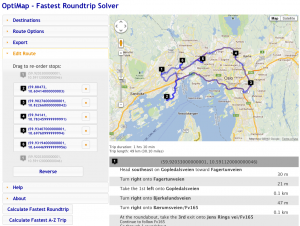
New user interface
Hold down shift while pressing reload to make sure the page fully reloads if OptiMap appears broken.
The first thing you’ll notice is a complete makeover of the user interface. The functionality has grown considerably since I first posted OptiMap in 2007, and the controls were scattered randomly around. Now, they are organized into neat little drawers on the left, in the order you are likely to be using them.
There is some new functionality as well. The ‘Edit Route’ section gives you the chance to re-order the trip after it has been computed. Have to visit one client first? No problem, drag to the top. You can also delete stops from the itinerary here.
OptiMap 4 also has a more powerful TSP solver routine. The new solver kicks in when there are more than 15 stops, and produces better and more robust solutions than the old engine. It is guaranteed to perform better than before, and in some hard cases I’ve tested, it improved the solutions by as much as 6-7%. That means that if you spent 8 hours on the road before, you now get home half an hour earlier.
Support for Garmin GPS units is now added as well. Support is experimental, since I only had access to one Garmin device, which did not support routes. I’m interested to hear whether this works on your device if you have a Garmin GPS.
There are some bug fixes as well: When pasting data from Excel spreadsheets into the bulk add box, the cell delimiters were lost. This is fixed. The print function used to show half a page of unnecessary white space at the bottom, thus it sometimes would print blank pages at the end. This is fixed so you won’t be wasting paper needlessly any more.
As a bonus, you may now access the service from a shorter address: www.optimap.net (the old address will continue to work, and the page will remain identical)
I hope you enjoy the update! Please post questions, feedback, bugs and suggestions here. I’m sure I broke something during the update…
Hi, quick question does optimap require a certain browser? ie 8 or 9? My problem is that my company computer i use has ie 7 installed and the map portion doesnt show up. Any thoughts would be great. Thanks.
I wasn’t aware of a browser restriction. Did OptiMap work before for you? I’ll check to see what I can find. I’ve tested on Chrome, Firefox and Safari, but IE isn’t available for macs, so I can’t easily test it.
I did some searching, and found a guy who had a problem similar to yours:
“Do you have IE enhanced security turned on? We recently were scratching our heads over problem #1 until we added the following sites to IE’s list of not-restricted (e.g., trusted) sites:
– http://*.google.com
– http://*.googleapis.com
– http://*.gstatic.com ”
Maybe it helps?
Thanks Geir.
I have been using your TSP Solver on my iPad and Garmin GPS while doing a trail delivery network in Brisbane Australia. V4 looks good, more stable, a little quicker and more robust. Safari on iPad runs out of memory at about 25-30 stops.
Again Thanks.
p.s. Look forward to the Garmin export.
Thanks for the report. I’ll see if there’s anywhere I can save some memory and I hope to have the Garmin code ready this weekend.
Garmin code is added, but it’s experimental. The device I tested on had no support for routes, so the route export feature is untested. There is an option to just export waypoints, which works on most units, but is a bit cumbersome to use.
The export to Google Maps is helpful thanks! If you could show the trip time between locations it would be very helpful! (now i currently export to Google maps to accomplish this)
Does anyone know a api that can convert the route data to other formats for other devices?
@gebweb, do you code custom solutions for paying clients, i may be interested. Can you please contact me?
Love this program. However, the latitudes and longitudes when you export the “Toggle Raw Path Output” are often different than the latitudes and longitudes that are bulk entered. This makes it difficult to compare what was entered with the resulting output.
Is there a way to make the longitude and latitude “Raw Path Output” data match what was bulk added?
Or perhaps a “Calculate As Entered” functionality could be added so that the “Raw Path Output” can first be associated with the data that is bulk entered. The “Fastest Route” could then be calculated and compared to the revised latitudes and longitudes that the program uses.
Hi,
I think adding labels to each lat, lng pair is more efficient than trying to match them with the original data. There is a way to do this, albeit a bit cumbersome, with the http interface and the name parameter. E.g http://www.optimap.net/?loc0=(60.0,10.0)&name0=home&loc1=(60.1,10.0)&name1=geocache1 . I’ll try to come up with a way to add labels to the user interface, but as always, user interface is my weakest side…
Geir
A simple but useful output would just be a list of the ordered stop addresses without the driving directions. One additional column of output information would also be helpful: the position index from the bulk added input list.
Hi,
Really liked the new look and options. It would be really great to have the option to add label. I would think a three column setup of lat, long, label would be very user friendly.
If it is difficult to split, you could add an option to label upload that would correspond to the lat long in the same sequence.
From new stuff, the ability to give an input of number of vehicles available would be great. Not sure how complicated the model becomes. It is something that a lot of people planning multiple routes would need.
Hi
“Toggle Raw Path Output” :
Your idea for adding labels to the original point – for easy match of the new ordered points with the originals is GREAT !
Waiting for this is well !!! (any idea when to expect this to happen ?)
could you please just spit a sample of the new input http request and its raw output so we can prepare our code ?
Many thanks for a great site !!
Hi Gonen,
I’ve had little spare time the last few weeks, and will be busy until late March, but the http request params will be
label0=your label&label1=…
in addition to the current params. The output is likely to be of the form
label1:(lat,lng)
label0:(lat,lng)
…
Hope that helps 🙂
1 – Super !
Will solve lot of problems for me and others and will make it very easy to understand the new route.
===================================
2 – Just would like to remind you about new routing option that we discussed already.
Currently we have A-Z and Round trip.
I named this new suggested option – “Tourist walking tour”
This option has a starting point (e.g – the hotel where he sleeps) and more points the tourist would like to visit (e.g – museums)
This option does not have ending point.
Why ? because when a tourist comes to town, he wants to walk through several points of interest in the shortest way. He does not care where will be the last point (As he plans to take a taxi back to the hotel…)
Is it complicated ?
===================================
3 – Please note that viewing the route on Google Maps, has the 25 points limit…
=====================================================
Great site !!!
Thanks
Hi Geir,
Great website!!!! I have a question, on the export function, would it be possible to export the route segments? Currenttly it only exports the way points coordinates. Would it be possible to export the total line segment coordinates?
Let me know if this is possible.
I appreciate your time,
Sincerely,
Hi Geir,
Would it be possible to export the route to KML?
Thanks,
Hey have you tried or is it possible to get a QR Code output from this?
Great functionality!
I believe I have found a bug, though. When I try to view in Google Maps, only the first 4/31 destinations is displayed.
Is there a way to export the list of addresses?
Below is the raw path output I am using:
(41.84434, -87.71935000000002)
(41.84617, -87.71971000000002)
(41.85087, -87.72543999999999)
(41.87481, -87.74504999999999)
(41.90419000000001, -87.72145999999998)
(41.90656000000001, -87.72153000000003)
(41.89190000000001, -87.70641999999998)
(41.8804, -87.68639000000002)
(41.89081000000001, -87.67689000000001)
(41.89686, -87.67462)
(41.90141000000001, -87.67474000000004)
(41.90328, -87.67236000000003)
(41.91775000000001, -87.67790000000002)
(41.91935, -87.68016999999998)
(41.91761, -87.68499000000003)
(41.93209, -87.69987000000003)
(41.93213, -87.69289000000003)
(41.93952, -87.68319000000002)
(41.93977, -87.66380000000004)
(41.94251000000001, -87.66389000000004)
(41.94258000000001, -87.65904)
(41.92171, -87.65607)
(41.87811000000001, -87.62979000000001)
(41.87811000000001, -87.62979000000001)
(41.85285, -87.6465)
(41.85255, -87.64648)
(41.83028, -87.68531999999999)
(41.85672, -87.67858999999999)
(41.85382000000001, -87.69056999999998)
(41.84999000000001, -87.69538)
(41.84626, -87.70137999999997)
(41.84434, -87.71935000000002)
Google Maps only handles up to 25 addresses, so that’s probably why they won’t display in Google Maps.
Also, it appears to not want to calculate a route if I try add the above raw output into the bulk address area.
Hi Geir
Any news about the:
label1:(lat,lng)
label0:(lat,lng)
thanks for any update
Hi,
Labels in the toggle raw path output, would be a nice update.
Now it’s almost impossible to use this ordered output, because it slightly changed the coordinats…
thanks for any update
I’am waithing for the next version
It’s been quite a busy time for me, but I’ll try to add labels in the raw output very soon…
We wait – Many thanks !!!!!
@Gonen, I finally got around to doing this. Sorry for the long wait and thank you for your patience!
There is now a new button under export which shows the raw path including labels when you press it.
To add labels, use the HTTP GET parameter called name, e.g: http://gebweb.net/optimap/index.php?name0=Start&loc0=(60,10)&name1=First%20stop&loc1=(59.5,9.8)&name2=2nd%20stop&loc2=Askroken%2051
Works perfect !!!!! Bravo !!!
wen i try bulk add by adress , he will not work.
N 51° 19.513 E 005° 34.912
N 51° 19.491 E 005° 38.323
N 51° 19.897 E 005° 36.315
N 51° 19.239 E 005° 33.969
N 51° 17.712 E 005° 30.942
N 51° 18.337 E 005° 31.993
N 51° 18.505 E 005° 32.369
he says :failed to geocode adress: N etc.
Reason: no result was found for this geocoder request.
Before the update there was no problem.
Ad,
Your list of destinations worked perfectly for me in Google Chrome. Maybe there was some temporary problem?
I copy paste it from an excell sheet and sometimes he will not accept the destination. when i delete the destination and i fill the excell sheet again with the same destination then it is correct.!!
I use it for geocaching.
I am trying to get address for around 50 locations but the system seems to freeze up and not give me any results
Hello, I noticed a little bug: if there is an apostrophe in one of the place-names, the “View in Google Maps” button doesn’t work (I think the underlying JS interprets the apostrophe as an end-of-string marker).
Thank you for your great effort and keep up the good job!
I fixed the bug with apostrophes now (by simply ignoring them).
Excellent tool! Will be donating for sure. I like the custom labels and the website integration which I am currently using. Although I would like to have this run strictly from my own site but I’m finding the code is confusing and it won’t work for me.
About missing waypoints in Google Maps: is there a way to modify the Export function, so that the comma following State is not exported to GMaps? As it is now each comma must be deleted by hand to avoid problems.
Great Program!
This might also resolve the lat/long variations mentioned earlier.
Excellent tool also for me.
I would like to know if there is a way to load on your web site a text string so you can directly insert the 10 addresses and give inivio “Calculate Fastest Roundtrip”.
Example string: “http://gebweb.net/optimap/index.php? …”
Thanks
Great tool for a service technician. I sincerely thank you and promise my donation is coming.
2 suggestions
1) Great job on the export to garmin & tom tom… Is there an export to Android? I tried using the “Chrome to Phone” app but to no avail.
2) I’ve set my book mark to the correct map possition and zoom, but is there a way to have the start and end point? (Just realized how lazy I am to not have to take 4 seconds to type in my address) Take it as a compliment, GebWeb is near perfection.
New tool for me. Friend asked me if I could find out how it works for geocaching. Copied the coordinates from geocaching to Optimap.
Calculated the roudn trip and exported to Garmin 450 Oregon without any problems. Great and thanks!!
@Dirk, Happy geocaching then! Let me know how it performs outdoors on that device.
Is there any way that we can plot more than 100 addresses at a time?
I too love this tool. I was using under GMaps v2 and am trying to migrate it to GMaps v3 using Optimap. It works perfectly, however for some reason the path that appeared in blue is not there. I just see my numbered icons on the map but no path drawn showing the route. Is there a setting to turn this off or on?
@Kevin
It’s a bug in Google Maps API 3.9. You have to force it to use 3.8 (see source of gebweb.net/optimap) for how to do this.
@rlong
Sorry, no way to plot more than 100 addresses right now. Don’t have the icons, and would take a really long time to solve. If you only need to plot, then I am sure there are many maps apps that will do that.
@geir
Awesome that worked great! One more question…I have numbered icons on the map…#1 is red, rest are green.
But the directions show #1 as red and rest blue. I don’t have blue specified in the js. How to correct this??
Great tool indeed! Many thanks guys.
One question though: how would it be possible to change the 1,2,3 pinpoints with other, more intelligible labels? (- such Start, 2nd, …Finish or maybe street_name or other)
Thanks and regards,
johnny
update: I’m trying to embed optimap as anIframe in my application – so not doing programming, but just calling the url with the address parameters. So is there a parameter to pass with other pinpoint name? – &label and &name not helping for changing pinpoints, but just for the directions.
@johnyy_q No, there is currently no option to change the pinpoint icon. Do you mean the icon or the popup when you click on a pinpoint icon?
Hi Geir,
I would like to change the pinpoint icon. But no problem if that’s not possible yet.
However, how could I change/show the popup when clicking the pinpoint – currently the address is showing in a popup if I click the pinpoint.
Thank you.
I’m trying OptiMap for the first time. I’m inputting 29 addresses int othe bulk loader. I click “fastest route” and then it stalls out compeltely. I mean, totally does not give me anything, even after 30 mins has passed! I heard great things, but am not experiencing them 🙁
Hi Geir,
first of all thanks for your nice work its so far the only solution i found that comes close to my needs!
I am currently in the middle to understand and refactor the salesman problem for my very own needs. I will get the problem of having more waypoints then avrg and rly want to minimize the API usage.
So i was thinking about let the client fetch the Distance Matrix instead of the Route from Google and then have to calculate the route on my server.
Is there a flaw in my thinking or why did you prefer getting the route data from Google instead of the distance.
Bye
Oliver
@Oliver your thinking is correct. However, the code for fetching distances was written before Google API had a distance matrix call. If you replace the code, the only thing you need to be aware of is that you have to make a few more calls to Google after you have computed the best permutation to get the full route. I would be very interested in including this code into the Open Source project if you succeed in refactoring it.
Hi Geir,
Optimap is great! Just one question: Would it be possible for there to be either an export of the postcodes in their final (optimized) order or for the optimised postcode list to appear in order on screen? This would be a big help! At the moment, once the tripped has been calculated, you can’t even click on the numbers on the map to find out which is which postcode. I suspect a lot of people will use this tool to order their itinerary and won’t really need the extensive list of directions; just the order of the waypoints.
Thanks,
Clare
@Clare, There’s a button called “Raw path with labels” inside the “Export” drawer on the left hand side after the optimized route has been computed. Does it do what you want?
Not quite. If I enter 30 addresses in no particular order and ask for the route to be calculated in an A-Z trip, it would be really useful to be able to export a simple list of the addresses numbered 1-30 in the optimized order. If I’m using this tool to plan a delivery route, for example, I need to know which address corresponds with each stop. So something like the “Raw path with labels” but with the postcode or address entered against each stop.
Does that make sense? Thanks for replying!
Clare
@Clare, I think I know what you mean now. Can you refresh the page and see if “Optimal address order” makes your day easier?
@Geir That is exactly it! Thanks so much for adding it. It will make life a lot easier for me (and, I think, others).
I am feeding addresses to a page…when I only have 1 address i get this error:
TypeError: legs[bestPath[i – 1]] is undefined
Any way to allow for only 1 address on a map?
Hi Geir
Nice work !!
Think this is good bit of programing, is it open source as I would like to make a couple of changes like map bigger on my screen,
I can confirm it works fine on IE 9 on windows platform,
and the garmin export works fine on the garmin nuvi 1490T model
which means it will work on all Nuvi models.
Thanks
Trying to map a round trip to all 48 state capitals in the US from a starting location and it times out every time using both IE9 and Chrome 21. I’m adding the following destinations (first destination home address withheld).
600 Dexter Ave Montgomery, AL 36130
1700 W Washington St Phoenix, AZ 85007
203 State Capitol Little Rock, AR 72201
1400 Tenth St Sacramento, CA 95814
200 E Colfax Ave, Denver, CO 80203
210 Capitol Ave Hartford, CT 06106
411 Legislative Ave Dover, DE 19901
400 S Monroe St, Tallahassee, FL 32399
206 Washington Street Atlanta, GA 30334
700 West Jefferson St Boise, ID 83702
500 S 2nd St Springfield, IL 62701
100 N Senate Ave, Indianapolis, IN 46204
1007 E Grand Ave, Des Moines, IA 50319
906 SW Jackson St Topeka, KS 66612
700 Capitol Ave Frankfort, KY 40601
900 N 3rd St Baton Rouge, LA 70802
210 State St. Augusta, ME 04330
91 State Circle Annapolis, MD 21401
24 Beacon St # 458 Boston, MA 02133
110 NCapitol Ave. Lansing, MI 48933
75 Rev. Dr. Martin Luther King Jr. Blvd, St Paul, MN 55155
400 High St Jackson, MS 39201
201 W High St, Jefferson City, MO 65101
1300 E 6th Ave, Helena, Mt 59601
1445 K St, Lincoln, NE 68508
101 North Carson St, Carson City, NV 89701
20 Park St, Concord NH 03301
125 W State St, Trenton, NJ 08608
491 Old Santa Fe Trail, Santa Fe, NM 87501
26 Eagle St, Albany, NY 12207
1 E Edenton St, Raleigh, NC 2760
600 East Boulevard Avenue, Bismarck, ND 58501
36 E Broad St. Columbus, OH 43215
2300 N Lincoln Blvd, Oklahoma City, OK 73105
900 Court St NE, Salem, OR 97301
400 Commonwealth Ave, Harrisburg, PA 17101
146 Smith St. Providence, RI 02908
1200 Gervais St Columbia, SC 29201
500 E Capitol Ave Pierre, SD 57501
600 Charlotte Avenue Nashville, TN 37243
112 E 11th St Austin, TX 78701
E 300 N, Salt Lake City, Salt Lake, Utah 84103
115 State Street Montpelier, VT 05602
1000 Bank St Richmond, VA 23219
416 Sid Snyder Avenue SW Olympia, WA 98504
1900 Washington St Charleston, WV 25305
2 E Main St, Madison, WI 53702
200 W 24th St Cheyenne, WY 82001
Any assistance would be greatly appreciated. Thank you.
Any way I can feed just 1 address without getting an error?
Awesome job dude!!
Geir,
I input the following in bulk:
(40.706544, -74.01285200000001)
(40.709782, -74.00971400000003)
(40.722248, -73.997188)
(40.708792, -74.005267)
And I get the following out:
(40.70648000000001, -74.01273000000003)
(40.70967, -74.00980000000004)
(40.72224000000001, -73.99716999999998)
(40.70884, -74.00522000000001)
Why does the output latlng(s) differ from what was input? I really need a solution for this problem. They should be the same since you are not geocoding anything unless the input is an address.
Please advise.
Thanks!
Thanks for this great tool. I got it to work quickly for about 20 addresses but now it seems stuck on 75, all in my small city. How long should I expect it to take to calculate this number and up to 100?
@Steven
Since its javascript doing the calculation it is dependent on your computer’s resources. The more available memory the better. I have an app that uses this script and have tried sticking to around 24 max as memory/load times was one consideration. Hope this helps.
Hi Geir! I have some problems with your program, how come it does not recognize the alleys and small roads? Kindly check the shortest path of these addresses.
(14.271584,121.069665)
(14.271586,121.069411)
same thing happens to google earth and some other online based router that I’ve used before, any solutions?
I’m doing the civic-minded, American thing and volunteering to do canvassing in this year’s Presidential race: 40 households on a Sat afternoon in the hot sun with no guidance as to how to traverse -just a Google map print out w/ a bunch of dots and addresses. Good luck wondering how many extra miles you walked.
Being a lazy engineer I *knew* there had to be some smart/nice guy out there who did some sort of shortest path whosey whats that would solve my problem. Bravo! Optimap is da bomb! It produced what looks to be a great navigation with my 40 households first time out.
Now I gotta make this work for all my fellow canvassers and not just me: in short, how do I automate to do dozens of routes week in and week out? Is there any sort of programmatic interface to Optimap? I know I can use the somewhat inelegant browser drivers (Selenium et.al) but I was hoping for a cleaner solution. Also: am I going to be running afoul of any Google Maps limitation on number of hits if I’m doing lots of routes (each of 40 destinations tops)?
Any advice is much appreciated and thank you again for your hard work in providing such a good service.
Best regards,
Russell
Hello
The tool works very well.
Is it possible to insert an additional rubric?
It would be helpful if you could add a comment or name to the stations.
It would be nice, if you could use a column in Excel for this.
Like: zip code, city, address, comment/name
Thanks and greetings from Germany
PS: It works with my TomTom XL-S IQ Routes
Hi Geir,
Great tool, really use it a lot and save a lot of time.
3 questions
– Is it possibly to ad the value of &name#= from the url variables to the pinpoints.
like “0-destinationname”
– Is it possible to add a time table. with time between points and total driving time:
something like:
#-name (time between) – (total time)
1-Start
2-destination 1 – (1h,23min) – (1h,23min)
3-destination 2 – (0h,18min) – (1h,41min)
1-Start – (1h,25min) – (3h,06min)
And Id would be great if I could add a stop time for each point where you stop.
Most of the time I lose 15 minutes add every stop, it would be great if I could add something like &stoptime=15min in the url variable.
– Maybe a option for max speed, when driving with a truck I have a max speed of 90, so total trip time is not correct.
As far as I know google maps does not have a max speed option, so that will be difficult.
or by question 1 maybe when you click on the pinpoint to see the &name# value in a label.
Your website ROCKS. IT WORKS. YES! Woot woot! I’m SO happy with the time this has saved me. And YES, the export function to my Garmin works PERFECTLY. Nice job.
What’s up dear, me plus my mother are as well watch funny videos however after I finished my homework
I can’t export. When I click on the “Export” button, a blank space appears underneath it, but that’s it.
@Jauchart: Did you click “calculate fastest roundtrip” before trying to export?
I want to export the route gpx file and I thought that I would be able to copy and paste the info into a csv file and it’s pasting as one line. Can you please advise how to save the file on my computer?
@Rosemary
I think the best way to get the route as a gpx file is to select the “Export” drawer, select “Send to Garmin”, then right-click the link called “Download GPX route file” and use save link as file.
Hello.
Great tool that you have…
In my site I have a map with 1365 markers (clients) and I use google maps to calc the route between some of the points. But I can’t use more than 10…
I would like to use your js but I dont know where to start. I try the example code but nothing happens. Can someone help me?
Thanks
I’m still experiencing issues and unable to get the route for the 48 state capitals (addresses listed above). I switched to the Opera browser as well to no avail. I’m running Windows 7 64 bit on a computer with 16G of ram. 7.5 out of 7.9 windows user experience rating. it’s a fast computer with plenty of resources, yet it still fails to calculate the round trip route to the 48 state capitals.
Any suggestions?
@Mike, I’m seeing the same thing here. I had no trouble computing a 100 destination roundtrip in New York, but I’m only able to get 2/3 of the way with the state capitals. I think that the issue is the long distance between these, which makes each leg consume much more memory, which is making the browser crash in the end.
So unfortunately, I don’t have a resolution for you 🙁
My route transferred to my Garmin Nuvi 2595 LM just fine and I was very happy that it did. It seemed like it took a few attempts to do it but finally the upload button appeared and it loaded great.
Thank you,
Wes
Colorado
Hello, I am trying to add about 30 addresses to map using a link, but the application freezes after 12 points are added. I have tried with different addresses and same result. Here is a sample link, any help would be appreciated. http://optimap.net/?loc0=400%20E%20HOWRY%20AVE%2032724&loc1=2678%20CORBY%20DR%2032763&loc2=2678%20CORBY%20DR%2032763&loc3=3750%20CORGAN%20RD32724&loc4=10%20JEANETTE%20DR32720&loc5=1101%20EVERGREEN%20PL32720&loc6=370%20CONNECTICUT%20AVE32744&loc7=373%20SHADY%20LN32763&loc8=123%20E%20HOLLY%20DR32763&loc9=2500%20N%20VOLUSIA%20AVE%2032763&loc10=811%20UPPER%20CAPE%20RD%2032763&loc11=1500%20EAST%20PKWY32724&loc12=120%20%20W%20NEW%20YORK%20AVE32720&loc13=505%20SANDALE%20CT32724&loc14=120%20E%20VOLUSIA%20AVE32724&loc15=2010%202ND%20AVE32724&loc16=318%20S%20OSCEOLA%20ST32724&loc17=416%20CORTEZ%20AVE32130&loc18=841%20W%20BERESFORD%20AVE32720&loc19=950%20S%20WOODLAND%20BLVD%2032720&loc20=986%20COUNTRY%20CLUB%20PARK32724&loc21=2285%20N%20KEPLER%20RD32724&loc22=502%20HARRISON%20PLACE%20DR%2032723&loc23=504%20HARRISON%20PLACE%20DR%2032724
Seems like there is an extra space in loc12= that is causing the 13th address not to geocode. For some reason, 120 W NEW YORK AVE32720 does not work, but 120 W NEW YORK AVE32720 works (notice the extra space between 120 and W).
There definitely should be a human-readable error message for this, but time is always short :/
Thank you for the prompt response, always the little things. Now trying to use this on an ipad seems impossible to reorder stops because dragging doesn’t work. Is there a touch/mobile enhanced version?
No, the webpage is unfortunately very mobile un-friendly. I don’t have much experience in user interfaces, so that’s the hardest part for me to get right. If someone with UI exp would come forward and work with me, I’d love to make a better mobile UI!
Dear geir:
I currently implement my own project and using your code to modified. May i ask where you get the icon after point on the map?after enter the address on the address field. Because after i click”calculate fastest round trip”, all work well, but din’t have the label on the map.
Great tool!
Garmin GPS 76CS export tests results.
Route and Waypoints exports reported successful but the waypoints export was not complete; there are only 3 waypoints (out of the 14 addresses) in the unit. (They were the first address and last plus one other.) The route in the unit contains 14 via points so it appears to be correct.
The GPX file exports of both the route and waypoints results in gpx strings. (Maybe that’s what’s supposed to happen but I expected a File/Save dialog box.) To see if the were valid strings I pasted them in a .gpx file and tried to open them with Garmin’s Mapsource program. Neither would open; the program reported they were not a valid file format. I imported the route to Mapsource from the GPS unit then exported the route to a GPX file and compared it with your gpx string. The most obvious difference is your escape character ‘\’ is being written to the gpx string. Here’s your a snippet of your export for the route point: . Here’s a snippet of the same route point from the export: . (I’m no GPX expert; maybe those ‘\’ are acceptable and there is some other problem.) Shoot me an email if you want clarification or additional testing. Thanks.
he there is no blue line anymore on http://www.gebweb.net/optimap/
use firefox (16.02) or IE (9)
@peter I noticed it too and will look into it once I have time. There was a big Google Maps API update yesterday. The other thing they changed is how many requests you are allowed to make per second. I just updated the code to get around that limit, but it does make the route computation slower.
@geir
Slower is (most of the time) no problem.
But some colored lines would be nice
Yeah, the blue line is back 🙂
Thanks…
hey the blue line is still not coming can u just tell me wat all changes have been done
@sharath: Try holding shift while clicking refresh to make sure you get the latest version.
hi i have been using your code for one of my application so should i have to change the entire file and check the same,should i have to change anything in BpTspSolver.js or can u just tell me wat all changes has to be done to get the blue line
@geir thanks geir got it, the blue lines are back ,is there a possibility to change the color of the line
Uploading the route to a Garmin 62SC seems to work. However, when I try to upload waypoints, it says it was successful uploading the route. Looking at the GPS, only routes are getting loaded, no waypoints.
Are you going to publish an REST API for optimap? I would like to gathering results (optimal numeric order) to desktop application. I can create request but I have problem with decode reponse. Any help will be very much appreciated.
Regards,
Here is a list of addresses i am trying to input. most of them default to an incorrect location.
2576 BAYVIEW Street , white rock bc
2854 BAYVIEW Street , white rock bc
12691 BECKETT Road , white rock bc
12757 BECKETT Road , white rock bc
12791 BECKETT Road , white rock bc
2076A BOWLER Drive , white rock bc
2250 CHRISTOPHERSON Road , white rock bc
2519 CRESCENT Drive , white rock bc
2678 CRESCENT Drive , white rock bc
2631 DOGWOOD Drive , white rock bc
12281 GARDINER Street , white rock bc
12227 GILLEY Street , white rock bc
2855 GORDON Avenue , white rock bc
2108 INDIAN FORT Drive , white rock bc
2118 INDIAN FORT Drive , white rock bc
1828 LILAC Drive , white rock bc
2603 MAPLE Street , white rock bc
15805 MCBETH Road , white rock bc
2832 MCBRIDE Avenue , white rock bc
2843 MCBRIDE Avenue , white rock bc
2970 MCBRIDE Avenue , white rock bc
3033 MCBRIDE Avenue , white rock bc
2711 MCKENZIE Avenue , white rock bc
1752 OCEAN PARK Road , white rock bc
1948 OCEAN PARK Road , white rock bc
1992 OCEAN PARK Road , white rock bc
2824 O’HARA Lane , white rock bc
2904 O’HARA Lane , white rock bc
3050 O’HARA Lane , white rock bc
12375 SEACREST Drive , white rock bc
12319 SULLIVAN Street , white rock bc
@Shawn, this seems to be a geocoding problem in Google Maps in general, since it is unable to find those addresses on maps.google.com as well. There’s not much I can do about that, unfortunately. The only thing is perhaps to not show default location if the specific address is not found.
Hy Shawn, i had all your adresses in optimap, just input it without ” , white rock bc”. But calculating takes too long.
Hy Geir, what code is inside tomtom.php please?.
Would you share that?
tnx – Martin
Thought sometimes is the fastest way not the best way.
take these 3 Points.
(53.37552, 10.229800000000068)
(53.55806000000001, 10.667529999999942)
(53.26367, 10.576090000000022)
Trip duration: 1 hrs 49 min
Trip length: 119 km (74.4 miles)
Shortest way is
Trip duration: 1 hrs 55 min
Trip length: 92.1 KM
so i don´t think that i would drive 27KM more for about 6 minutes difference.
So maybe overlay it all with the “shortest a-z trip” or “shortest roundtrip” ?
I’m using your service to help our boy scout troop plot the routes to pickup old christmas trees. is there something wrong right now because I can’t export or print. in the past when i tried this i could.
thanks
joe
That’s strange, I can both print and export. Which export option are you trying to use? Which browser are you using?
Hi Geir,
I was wondering if it is possible to export a list with the following data:
In the optimized order
– adress
– traval time
On the site itself it only gives the totall travel time. For my job i would like to use the traveltimes between the locations.
Also, i plan routes for deliveries, and we use trucks to deliver. Because of that the traveltime from google is never correct. For me if i multiply the total traveling time with 1,35 i get the right average. Or either
0-10 minutes = +3 minutes
10-30 minutes = +5 minutes
30-40 minutes = +10 minutes
40+ minutes = +15 minutes
(i rarely have more then 60 minutes between these.)
I understand if the second part is maybe a bit overkill for you, but i would really appreciate the time between locations in a list.
Gido
This solution is awesome and does a great job optimizing routes! Nice job with the site. One enhancement I would like to see (as Martin points out) would be the option for the “shortest” route. With the price of fuel it would be nice to know how many extra miles are being used vs the time you are saving. Also how can I donate directly tomthis cause w/o using flattr?
Can you add a checkbox and another if statement in function directions such that you can choose Bicycling?
@Pete,
Bicycling added 🙂
@Rob,
I could add an option to calculate the shortest route, but in reality it would not be the shortest route, because Google returns the fastest route between each pair of destinations. If I take the ordering of such fastest routes that give the shortest overall trip, it still would not be the shortest possible trip, and calling it the shortest trip would be a bit misleading.
A donation via PayPal to geir.engdahl@gmail.com is always appreciated. I really like the idea of Flattr, though, and I think there are many sites out there which deserve to get paid a little for their content.
how are bulk addresses entered? thanks
Hi,
I very much like OptiMap and use it for planning a route of normally 8-9 appointments on one day. Although times may differ in practice, I have to inform several people of my estimated arrival time. For this it would be fantastic, if OptiMap would not only give the total travelling time, but also the travelling time between two locations. Would this be realistic to implement?
Thanks a lot!
Jost
@ jost,
Same for me!!
a option like that will be great.
also a option to calculate a “Stop Time” for each stop to the total time would be nice.
peter.
It has been working fine, but this time I’m getting this message when I try to export.
Fatal Error: File Path: C:\DOCUME~1\steve\LOCALS~1\Temp\npGarmin\tmpD1.tmp, line: 1, char: 5102 Message: expected entity name for reference
I found the problem. I was loading the bulk addresses and one of them had an &, as in 604 & half.
What a great site Geir!! Fantastic for travellers.
I have found that GPS devices are not a lot of use for my requirements. (and there are tens if not hundreds of thousands like me)
The problem is that a GPS offers the choices of avoiding Toll Roads, Un-paved roads, routes with ferries, Car Pool lanes etc, but none seem to offer what we need, which is the shortest route, BUT, keeping to major roads, (avoiding minor roads)
Choosing the Shortest Route often takes us on back roads which depart a Highway, then re-join the same highway again a bit further on just to save a hundred meters of so, which is no use for someone towing a caravan, or driving a 30 foot motorhome.
Choosing the Fastest Route usually takes a completely different path which we do not want either.
What seems to be un-achievable is to plot a route that we want, on a site like yours, and then upload it “as a route” to the GPS, rather than as a series of positions, which the GPS then calculates the route for.
I see that on your Route Options you have a choice to Avoid Highways, but no choice to “Keep to Highways”, or “Avoid Minor Roads”, which is what all caravaners and motorhome drivers need.
I know there is no point in trying to get GPS manufacturers to do anything about it, so we are dumping our GPS and mapping our routes on Optimaps and taking the Laptop with us, so it would be a great help to us and the many thousand of fellow travellers if we could plot “Shortest Routes on Major Roads”
PhillT
Dear Sir,
I am using optimat to plot best routes for picking up children and bring them to school and back home with several small schoolbusses. I am not a programmer. I use Excel to bulk add addresses. Your site gives me a good estimate of the best routes and what bus i should add a child to.
I would like to thank you for your work!
Jan.
Hi,
Please please add the option to avoid tolls. You currently only have the option to avoid highways. You can see there is a valuable difference.
Syed
Hi there,
just wondering is it possible for OptiMap to resolve later appended lat lng/address without have to reslove the route from first point?
for example I have added 26 points in the map and got the fastest A-Z trip result, I then added 27th point and and ask for the fastest A-Z again and it seems like optimap was requesting all the routes again from google?
thanks,
Leo
Hi Leo,
It is possible, but requires a bit of code. As I’m quite busy, there’s a big back-log of features that are possible and nice to have, but not yet implemented.
Hi Geir,
thanks for the reply, no worries good things takes time, looking forward to it.
thanks,
Leo
ohoh, the blue line is gone.
tested it on IE 9, Chrome 25 and Firefox 19.
@peter, Now the line is back (albeit black). Thanks to Richard Pangborn for submitting the fix to the OptiMap open source project.
Thanks for the Quick fix Geir
Hello,
is it possible to have fixed start and end points, so that you can easily change number of middle points?
Hello,
Optimap seems to be calculating route extremely slow/not at all. I used this system about 3 weeks ago and it was a lot faster. Is there currently a problem with the system?
Since all the routes are saved to the browsers memory requiring a massive amount of ram would there be any way to save the routes as flat files to the server and delete them when the routing is done? Or since it’s all client side? maybe to the local file storage somehow? This is probably impractical or impossible but with all the mundane requests above this is one that I think would be a game changer for solving long routes… thanks for your time.
great web site! unfortunately for some reason right now after plotting all of my locations, it goes very very slowly during the a-z route calculation. I have tried several browsers all with the same problem.
This recent slowness seems to be caused by a recent update on Google’s side, designed to stop users from sending too many requests at once to their servers. Unfortunately, I’ve found no way around it (yet).
Will keep trying. If anyone else has any ideas, that would be great too.
Great tool! I use this when planning my work trips. Can you add the drive times between each location?
Hi Geir, just calculate a route and I see the route drawn on the map, there is a problem or something with my browser?
thanks
Hello!
There seems to be a problem because it does not draw the route on the map!
I hope you can fix it soon
A greeting
@juan, @Oyito: This bug should be fixed now. It was due to an update to Google Maps.
Just wanted to thank you for your effort and let you know that the Garmin export appeared to work just fine with my Zumo 550.
BIG Thank You!
Amazing work!
Can you please put Miles as an option instead of Kilometers. It would be nice to see how many miles it takes to get to each stop and the times for each stop would also be great but miles would be a nice option to have since we use miles more in America then anything. Thank you!
We suggest your site to a customer of ours, they reported that some of the routes that are suggested are avoiding minor roads.
This is causing the routes to have big diversions in them is their anything you can do with this or is a problem with google maps.
Hi Jaime, there is nothing in Optimap that makes it avoid smaller roads, so you would likely get the same results with Google maps. Optimap and Google maps tries to minimize travel _time_ instead of _distance_, so it could be that a bigger road is longer, but takes less time due to higher speeds.
I want to request an AVOID LEFT TURNS function. That would be awesome. If this is in the works or already suggested (as it should be) please don’t be upset. I really just wanted to put that out there without reading very much. It’s kinda lazy but laziness brought me here. I mean, who wants to make a ton of left turns on busy streets where you’ve gotta wait for oncoming traffic to pass… not to mention all the traffic you impede while you wait!
By the way… y’all are pretty awesome. Like really.
Loving this, thank you!
One suggestion: allow the possibility of defining clusters of addresses, with routes for each displayed on the same map . There could be an option for shortest total travelling time, or shortest average travelling time, or to make the clusters equal in terms of either distance or number of stops.
Such a feature would be useful for a group of postal or charity workers to visit widely dispersed locations in a town. You’d put in how many workers you have available, select appropriate options as described above and the routes available for each worker would be displayed.
This is a GODSEND! Now the bad news is it isn’t working for me:(
I enter 50 address in the bulk box and then hit add list of locations, the all show on the map with red markers, when I hit either plan route option I get the loading box and nothing happens. It just sits there, nothings moving. The grey diagonal lines that show up over the screen do not move? Any help? I’m on Safari on a Macbook Pro.
Simply wonderful! You’ve made a great job.
Just a little request:
It would be useful if we could obtain the coordinates of a list of locations without calculating the routes.
It could be perfect if we could extract a csv file like lat|long|address
(to be exported to Tomtom as POI list)
Great service, works a treat every time. Just got a nuvi 2440 and tried exporting routes. The waypoints go in no problem under “recently found”. Tried exporting routes and it only sometimes goes in, more often it doesn’t. It’s found in “trip planner” when it does work. I do everything the same so I’m not sure what’s going on there.
Thanks.
Hi,
I have a usage scenario and a suggestion.
I tried to plan a trip with stops where I need to pick up kid (takes 10 min), be at a certain time at the dentist, stay there 45 min, then shop something if I have time (takes 5 min in store), then pick up other kids before they close daycare. My goal is to know when to start the trip, so that I can be at a certain time at a certain place, then spend a given time there, for multiple stops.
So it would be great if I could specify the constraints, such as for each stop and the starting point and destination, optionally specify max arrival time or min departure time, or min/max duration of stay. The route would show me arrival/stay/departure/travel times for segments and stops.
Or, simpler, just let me enter start time for the starting point and also override the departure time for each stop (or enter delay at each stop) one by one, and show me the route with times for all stops and the destination after each overridden time at each stop. I can then adjust the stay/start times until I meet the constraints I have in mind.
Or at least show the travel times by segment (and then I would be able to add the delays and subtract from arrival times myself).
Now (as far as I can tell) I can see the overall travel time only, which is helpful, but only if I didn’t have any time constraints except for the destination.
It could also help if I could easily move/remove the destination (which would make a new destination out of the last stop before the old destination), so that I can experiment with what to visit last.
Thanks for considering it.
love this site and am looking to get a garmin that it works with for the send to option. any ideas on which is best. i do routes of around 50 stops in a day
Thank you.
I’ve not run into really many issues thus far. Sometimes loading hangs, but easily gotten out of the with a page refresh or a “Start Over”.
I did just run into a Geocode issue today.
Address will not geocode.
519 East Gude Drive Rockville MD 20850
Whereas address will geocode.
520 East Gude Drive Rockville MD 20850
I don’t know any significant reason why one will and the other will other than it seems Even numbers will and Odd numbers will not. If I leave out the City and State (Street Address and Zip only), then it will geocode. I don’t follow whats happening on the backend on that one.
Routes worked for me on my old 1490 Garmin and also on the new Garmin 2595, after I figured out how to do it.
Thanks
Don
Amazing blog! Do you have any hints for aspiring writers?
I’m planning to start my own blog soon but I’m a little
lost on everything. Would you recommend starting with a free platform
like WordPress or go for a paid option? There are so many options out there that I’m totally confused .. Any suggestions? Thank you!
Is there any way you can add the option of choosing a straight-line (or even better, great circle) route? I want to use this app to solve a shortest-distance problem for multiple locations over which I will fly an airplane. So I obviously have no concern for following roads and such. I just want to plug in multiple lat/lon coordinates and get the optimal order in which to fly among them via direct routing. Seems an easier algorithm to write than one dependent on terrestrial infrastructure.
Geir,
Awesome work!
Is there any easy way to make the displayed google map interactive so we could search in it and add the waypoints directly off the map?
Right now, I have to have Maps in a window, grab a bunch of points, and manually copy over the addresses.
I *was* trying to use Google’s Mapengine to pull the routes into a layer and export to a KML file, but it throws it into an XML format with lat,long … which would be great if your app could eat it and pull the and … that would be too awesome.
Anyway, I found KLM2CVS, further mangled the data in OpenOffice and finally paste (slightly modified) into your app. Long way to go! Search and click-to-add would be *so* nice.
Just a thought for an otherwise totally cool app!
Great page but why does nobody consider that you might be traveling with trailer or van and will not be able to make uturns or park across the street on residential streets. I pick up people with special needs in a bus and uturns are not possible and sometimes add a very long detour, and I have to park in front of location. It would seem to be very easy to add a “if then” for a right side route into the program and then just a parameter for smaller roads. Then again maybe I’m wrong.
Geir:
You’ve done truly excellent work on Optimap. To ensure the safety of children boarding a school bus, please consider adding an option where all resulting destinations would be “Destination will be on the right”. If a fee is required, please provide a quotation for your consulting services.
Respectfully,
John Pingel
Hi,
I think Gonen has already suggested this but is it possible to have what he/she calls ‘Tourist walking tour’?
Where you have one starting point and then routes/distances to a selection of postcodes or lat/lons. Would be so useful for me!
Great site – currently close but no cigar!!
Cheers,
James
I am trying to route 77 addresses, i have been in front of my computer for 30+ minutes. Is this normal? I have a mac pro and not sure why it takes so long to download. I use both fire box and safari….great site very useful with 100 addreses, just don’t understand why its sooo slow…
Hi,
i am trying to use export to google maps.. but i have a problem because i entered all the address in Hebrew.
hope you can help me.
thank you!
Hmm it looks like your site ate my first comment (it was
super long) so I guess I’ll just sum it up what
I wrote and say, I’m thoroughly enjoying your blog. I too am an aspiring blog writer but I’m still new to the whole thing.
Do you have any recommendations for rookie blog writers?
I’d really appreciate it.
Works on Garmin Nuvi 1490 just need to go to the settings
then my data and import the route and works
Thanks this has helped make routes for me
If you could tailor this for FedEx ground… You could make a ton of money from it. FedEx ground has no GPS maps or any type route planner. We take manifest ( 150 + stops) and have to map it ourselves.
I tried out 86 stops. It mapped them, but then it froze when calculating the fastest trip.
You can email me if you are interested in dev or testing.
Maybe I’m not seeing it, but some of my runs list distances in kilometers, others in miles.
I’m in the USA, and while I personally like the Metric system, my car’s odometer is in Miles.
Is there a toggle I missed?
Geir,
Fantastic piece of coding! Question, is there a way to extend URL with “calculate fastest A to Z” without a user click?
Thanks in advance
-Sean
Sean, it is possible to put &mode=1 at the end of the url. That will trigger A-Z calculation.
David, there is no way to get miles I think. Everything should be in km.
Geir, Thanks for the &mode=1. Work’s quite well. I’ve got some weird results that I can’t duplicate manually. I’ve extended my URL with incrementing loc=n&loc=n+1 etc etc… but on random occasions I’ll get a very wild result from a zipcode which, when pasted into maps.google.com, locate properly. Any suggestions on troubleshooting? I’m sure it’s something I’m passing but the url I’m generating is clean.
Good Day!
I request the following possibility.
One option to be marked BEFORE your route, only to set the connection points added without OPTIMIZE (REORDER) best paths.
With this route would follow the exact sequence that the user has added the points on the screen.
WHY IS THAT?
Sometimes already used the site to order the points, but we want to play again the coordinates and make small adjustments.
Sorry for the English, was translated by google.
_____________________________________________________________
Bom Dia !
Gostaria de solicitar a seguinte possibilidade.
Uma opção para ser marcado ANTES de calcular a rota, para definir somente a ligação dos pontos adicionados sem OTIMIZAR (REORDENAR) os melhores caminhos.
Com isso a rota iria seguir a exata sequencia que o usuário adicionou os pontos na tela.
POR QUE ISSO ?
As vezes já utilizamos os site para ordenar os pontos, porém queremos novamente jogar as coordenadas e fazer pequenos ajustes.
Desculpe pelo inglês, foi traduzido pelo google.
Complementing would like what makes this example
“Complementando, seria parecido com o que faz nesse exemplo”
http://www.geocodezip.com/v3_directions_Click2Draw_interactiveroute.html
hi Geir,
There is a problem with “Drag to re-order stops”you can rearrange the adresses but the map is not responding on it.
also the button “calculate Fastest round trip” is not working correct.
it duplicates the adresses in the list.
I add the adresses by url like this:
http://www.gebweb.net/optimap/index.php?loc0=2525TV&name0=start&loc1=52.1817221,5.9653122&name1=name+name1%20%20Apeldoorn%20%20%200,14712%20%20kub&loc2=51.4921114,4.2905694&name2=name+name2%20%20Bergen%20op%20Zoom%20%20%200,18406%20%20kub&loc3=51.5032353,3.8895550&name3=name1+name2%20%20Goes%20%20%200,36170%20%20kub
peter.
Hi peter,
Thanks for the heads up! I was trying to make optimap a little faster last weekend, and inadvertently broke the reordering functionality. It should be working again now.
GREAT
thanks geir, its working fine again
Hello.
Thank you for building and making this service free and available to all.
I am wondering if this website program will stay available and for free.
Since I depend on this site to make my daily routes for my current job picking up donations for big brothers donation center.
Thanks again for this site.
Oh, I forgot to mention something about the program.
Every time i use it, I right click on the white below the map and go to inspect element and change “div.mymap {height: 480px}” to 1200px. This allows me to go into f11 full screen and be able to print screen a lot more area and put into photoshop to piece together my whole route and print it off.
If you could make your mapping program auto detect the browser resolution and auto adjust, that’d be greeaaaat. 🙂
Hi Shawn,
As far as I am able, the service will remain free and available to all. However, it is built on top of Google’s maps service, and if they change terms or start to charge for its use, it is out of my control. But as long as it is up to me, OptiMap will remain free and available 🙂
PS. I made the change to auto-adjust the height of the map 🙂
hey! great thanks a bunch.
Just checked it out and it looks like the auto adjust goes maximum to “element.style {height}” of 812px now.
“<div id="map" class="myMap" style="height: 812px;
its fine though if you cant make it automatic.
It doesn’t work! Just tried it a couple of times, First with n=9, then n=3. Push calculate fastest route…….nothing happens!
Tried it again. Doesn’t work on IE10, does work on Google Chrome.
Robert,
Are you sure you are not running IE10 in IE7 compatibility mode? It doesn’t work in IE7 for sure. Problem with IE is it is the only browser that only runs in Windows, and that makes testing it a pain for developers who don’t use Windows (I left the Windows world in 2006 and have never looked back 🙂
Bonjour,
Est-il possible d’utiliser votre outil en lien avec une autre application automatiquement, c’est a dire que l’application envoie des parametres comme adresses + options d’itineraire puis lance le calcul et recupere le resultats ? Merci pour votre reponse. Votre outil est sur efficace et tres rapide. J’adore !!
I shouldn’t be so critical about using something for free, but No I am not using Internet Explorer 10 in the compatibility mode. Your software does not run on IE10 in any mode. I am shocked by your answer about non-use of Internet Explorer. According to Netmarketshare’s most recent data (October 2013), Internet Explorer usage is 49% of the browser market….the next three are 18%, 16%, and 10%. Being a retired engineer and having worked in new product development for over 30 years, it was drummed into my head to satisfy customer’s needs, not your own. FYI, my need to see your software work in IE10 rather than Google Chrome browser, stems from the fact that the Google Chrome browser does a terrible, almost unacceptable, job of printing the map.
@Robert, I did test it in IE 10 now, and it worked fine for me, both for addresses entered and locations added by clicking on the map. Can you press F12 to open the developer tools, go to the “console” tab, perform the operations you were doing and see if any error message appears?
I did what you asked in IE10. It took the addresses and they got added to the map, but when I pressed Calculate Fastest Round Trip, I got nothing. Here is the info from using the F12 Console:
SEC7114: A download in this page was blocked by Tracking Protection.
https://ajax.googleapis.com/ajax/libs/jquery/1.7.1/jquery.min.js
SEC7114: A download in this page was blocked by Tracking Protection.
https://ajax.googleapis.com/ajax/libs/jqueryui/1.8.16/jquery-ui.min.js
SEC7114: A download in this page was blocked by Tracking Protection.
http://platform.linkedin.com/in.js
SEC7114: A download in this page was blocked by Tracking Protection.
https://ajax.googleapis.com/ajax/libs/jquery/1.7.1/jquery.min.js
SEC7114: A download in this page was blocked by Tracking Protection.
https://ajax.googleapis.com/ajax/libs/jqueryui/1.8.16/jquery-ui.min.js
SCRIPT5009: ‘jQuery’ is undefined
optimap, line 21 character 3
SEC7114: A download in this page was blocked by Tracking Protection.
http://platform.twitter.com/widgets.js
SEC7114: A download in this page was blocked by Tracking Protection.
http://platform.linkedin.com/in.js
SEC7114: A download in this page was blocked by Tracking Protection.
http://www.google-analytics.com/ga.js
SCRIPT5009: ‘_gat’ is undefined
optimap, line 271 character 1
Invalid App Id: Must be a number or numeric string representing the application id.
FB.getLoginStatus() called before calling FB.init().
SEC7114: A download in this page was blocked by Tracking Protection.
http://static.ak.facebook.com/connect/xd_arbiter.php?version=28
SEC7114: A download in this page was blocked by Tracking Protection.
https://s-static.ak.facebook.com/connect/xd_arbiter.php?version=28
SEC7114: A download in this page was blocked by Tracking Protection.
http://www.facebook.com/plugins/like.php?api_key=&channel_url=http%3A%2F%2Fstatic.ak.facebook.com%2Fconnect%2Fxd_arbiter.php%3Fversion%3D28%23cb%3Dfcd91d681eeb73%26domain%3Dgebweb.net%26origin%3Dhttp%253A%252F%252Fgebweb.net%252Ff319a742706fba6%26relation%3Dparent.parent&colorscheme=light&extended_social_context=false&font=arial&href=http%3A%2F%2Fgebweb.net%2Foptimap%2F&layout=button_count&locale=en_US&node_type=link&sdk=joey&send=true&show_faces=false&width=400
SEC7114: A download in this page was blocked by Tracking Protection.
http://maps.googleapis.com/maps/gen_204?ev=api_viewport&cad=mt:m,c:37.43458%2C-122.1419,sp:2.09343×8.11340,src:apiv3,ts:pamh59
SEC7114: A download in this page was blocked by Tracking Protection.
http://maps.googleapis.com/maps/gen_204?imp=smimps%3DHty7cnMc_XB,C0knCztgAP-,LViX1UB6Wv_,DKvapwei1vc,IJkg7dwQw9M,GJthk7BPb26,EQK3_mfHvRk,HcmsG-bm755%26z%3D8&cad=src:apiv3,ts:pamh6f
SEC7114: A download in this page was blocked by Tracking Protection.
http://csi.gstatic.com/csi?v=2&s=mapsapi3&action=apiboot&rt=jl.7,mc.26,mb.60,vt.201,prt.201,plt.182,mt.201,ep.249&size=1477×480&maptype=m&vr=0
SEC7114: A download in this page was blocked by Tracking Protection.
http://csi.gstatic.com/csi?v=2&s=mapsapi3&action=geocoder&rt=gsc.9
SEC7114: A download in this page was blocked by Tracking Protection.
http://maps.googleapis.com/maps/gen_204?ev=api_viewport&cad=mt:m,c:33.659645%2C-112.343858,sp:0.00027×0.00099,src:apiv3,ts:pan9c0
SEC7114: A download in this page was blocked by Tracking Protection.
http://maps.googleapis.com/maps/gen_204?ev=api_viewport&cad=mt:m,c:33.65397%2C-112.347057,sp:0.01715×0.06339,src:apiv3,ts:pantb5
SEC7114: A download in this page was blocked by Tracking Protection.
http://maps.googleapis.com/maps/gen_204?imp=smimps%3DIkPjicTfmWz,DI3V295lhPh,Iw7YJXDuht,CihDlIUEliE,Hb2m1vuMoWo,JNadg33nQQ0,BJJql6ohO-q,PPJyiQvGFe_,DVw7jVjVe31,IPX9vGOd4cH,B3occFPLEgn,MwMlWiKNsvu,JNWsJ0hiF5p,GeoCf1Y3bp2%26z%3D15&cad=src:apiv3,ts:pantbn
SEC7114: A download in this page was blocked by Tracking Protection.
http://maps.googleapis.com/maps/gen_204?ev=api_viewport&cad=mt:m,c:33.66875%2C-112.354737,sp:0.06858×0.25354,src:apiv3,ts:paog1z
SEC7114: A download in this page was blocked by Tracking Protection.
http://maps.googleapis.com/maps/gen_204?imp=smimps%3DIJdl1UOG7xv,GiTkr3PkCgQ,Hmegj65a2pe,w6LEfcFxOU,NMh_c6Utw39,IiJSOZ1e6Vt,FgKZNSXN8Fc,CI9ExhmZVAw,OoRIbAD4FKl,CPyp3mxpgbs,M0XOcyoNNdr,LTPlxRdLpDm,Eni7LqoG-j0,CArJmgLERSC,O1y8aifBFzy,LufW7FOAC_i,EBDmM2YRcPK,ODrHlfA8XrX,LxM1sU8ZUlG%26z%3D13&cad=src:apiv3,ts:paog30
SCRIPT5009: ‘jQuery’ is undefined
tsp.js, line 418 character 5
hi geir did you find any solution for slowness, i.e about the google request per second ?
Help required,
I am trying to link my Garmin to Optimap and sometimes it uploads the routing fine other times I get the following script.
Fatal Error: File Path: C:\Users\Jason\AppData\Local\Temp\npGarmin\tmp6C9E.tmp, line: 1, char: 10582 Message: expected entity name for reference. – the tmp numbers and characters change each time I retry!
Can anyone advise please?
IO am trying to get optimap to show me the best route for around 90 locations. The map enters the locations and they all pull up but when I click find fastest route A-Z it starts running (the completion bar pulls up) but it only gets about a quarter of the way and then stops. Is there any way to get this to work?
I know that it is a dumb request,
but could you publish a source code of yours index.php?
I was referring to the site http://www.optimap.net/
@Jan, what will you use it for?
Hi there,
I’m trying to get a solution between data set of 60 coordinates in latitude/longitude around the US. It’s quite a lot, but your program seems to be working fine until I get a “request failed: undefined.” Is the issue based on how many coordinates, or on the amount of data I’m requesting? I’ve tried on Safari, Chrome, and Firefox on this Mac running 10.8.4, and IE and Firefox on Windows 7.
Thanks for all you do!
~lys
the set:
35.110703, -106.609991
33.748995, -84.387982
30.267153, -97.743061
44.801182, -68.777814
33.520661, -86.80249
25.901747, -97.497484
30.877413, -84.20129
41.878114, -87.629798
39.103118, -84.51202
41.499495, -81.695409
44.909773, -67.070259
36.380288, -75.830778
32.78014, -96.800451
40.947816, -90.37124
40.2737, -76.884418
30.750805, -104.193092
34.052234, -118.243685
36.114646, -115.172816
35.149534, -90.04898
25.788969, -80.226439
32.366805, -86.299969
29.951066, -90.071532
40.714353, -74.005973
27.167827, -80.266159
45.523452, -122.676207
40.233844, -111.658534
40.58654, -122.391675
35.282752, -120.659616
37.774929, -122.419416
37.339386, -121.894955
32.715329, -117.157255
42.172784, -91.107648
47.606209, -122.332071
38.627003, -90.199404
30.438256, -84.280733
27.950575, -82.457178
40.217053, -74.742938
37.865101, -119.538329
29.657955, -82.301773
39.290385, -76.612189
48.759553, -122.488225
42.886447, -78.878369
39.737567, -104.984718
41.600545, -93.609106
35.994033, -78.898619
40.371463, -78.777521
33.495914, -105.523036
47.925257, -97.032855
29.760193, -95.36939
33.577863, -101.855166
36.166667, -86.783333
41.252363, -95.997988
42.638922, -83.291047
38.581572, -121.4944
36.974117, -122.030796
38.402136, -122.823881
42.499994, -96.400307
47.912876, -122.098185
43.422619, -95.102231
36.153982, -95.992775
31.549333, -97.14667
~lys
@lys, looks like there is a problem finding a path between one of the points and the others. Is there one that is not close to a road?
I’d like to use it as route calculation for my band (Kontrabant) trip.
So i’d like to see how are you passing route requests to you script.
And another thing, I can’t figure it out how to add labels to points on already calculated route.
geir-
in theory no, but I could understand the program getting confused. I stopped inputing by coordinates and added manually by place name, and it seemed to be doing much better after I removed a few potentially problematic spots. but it still halts after about 1/6 of the bar is full. the points are all major cities or towns, all accessible by road one way or another.
~lys
Hello, why not implement a url parameter that forces the optimization of the waypoint before the html is generated? I need to work on waypoint optimized but instead file_get_contents course …. can not supply them.
awesome programming! i use this to do door to door sales and plan my route of 50-75 houses per day. on my Garmin device, the route planner only allows 25 entries. i have no problems so far uploading up to 75 at a time to my GARMIN 3490. Thanks
Great job. 15 addresses pushed into my Garmin GPS.
It would be nice to be able to export the trip data for archive, tax reporting requirements. We are supposed to be keeping records if the trip is a tax deductible expense. Those paper log books are a pain. thanks
Great Job,
file exported with garmin communicator, 25 addresses
works perfectly on garmin 2447
thanks
SEND TO GARMNIN – EXPORT NOT WORKING
In the past export worked fine (Garmin). Had an update to IE 11 two months ago which caused export not to work. (Garmin Plugin problem?) Installed Google Chrome and was exporting fine again. Tried today in Chrome and not able to export to Garmin. Tried exporting in IE again with no success either.
For clarification, I have been using the “Export Waypoints” feature.
also was using the export waypoints function and also have found last 2 days the button is not working
Tried to export to Garmin again with no success.
Use OptiMap regularly for bulk address route planning and export to Garmin Nuvi 3598, for the past four months.
On occasion I have had to refresh the page (Firefox browser on Win 7) When the Export Route and Export Waypoint buttons fail – I manually copy the contents of the OptiMap “Download GPS file” directly in my Garmin, Internal Storage/GPX Folder – replacing the contents of file: myData.gpx. Other than that no issues.
Great tool – thank you.
Geir, Thank you for fixing the issue! I was able to successfully export waypoints to Garmin (from Chrome and IE 11).
working great thanks again
Nice clean implementation. Great coding. Thumbs up!
Bug Report: Latest Google maps on android 4.4.2 does no properly
accept the export from optimap.net, thus one cannot use google
navigation.
Under Linux with Firefox browser, export to google maps
automatically switches to classic google maps, which works great.
The new google maps does not yet accept multiple routes…
Cheers,
Keith Savage
Hi
Think this is a brilliant tool and used very successfully for last 6 months or so. We make multiple house visits, but it does seem to struggle with more than 50 postcodes. The last 2 days, we have been getting more and more error messages “request failed: undefined”. We recently had an issue with Google Chrome, so are operating from google – could this have caused these errors? I’m not a great technie, so simple language please 🙂
Thanks, Kim
Hi,
First off, the service is fantastic, I have used for a few (private) routings.
my question is: do you have any idea how long a computation should take for a given number of nodes? I gave it 76 nodes (“public bike stations” (like Bacrlays bike or Velolib) in Budapest) and it has been running for three days (72 hours) now and it doesn’t seem to be doing much: it doesn’t seem to be using much CPU (about 0.2% on avg., running in a dedicated Chrome window) or memory and according to Fiddler, it only send a query to Google Maps every 45-60 or so minutes.
If it is somehow related to the Googe Maps quety quota, is there a way to get around it? Maybe running it on an own server with an own Google Maps key? (I only want to calculate an optimal way to visit all said bike stations on the opening day I have no commercial intentions.)
Best regards,
Kristóf
For the record, the 76 nodes are:
47.491065,19.044943
47.497438,19.041472
47.499884,19.025506
47.503436,19.039722
47.506532,19.039457
47.507876,19.026947
47.510233,19.039304
47.510405,19.034375
47.515011,19.039804
47.487173,19.057220
47.491323,19.058251
47.491720,19.052883
47.492551,19.056617
47.494715,19.056139
47.496002,19.048821
47.497100,19.055118
47.497502,19.048008
47.497765,19.050259
47.497854,19.053507
47.499120,19.054509
47.500784,19.047248
47.502960,19.051238
47.503272,19.054246
47.505435,19.048717
47.506967,19.054855
47.508612,19.048209
47.511908,19.051374
47.500704,19.056729
47.503465,19.060812
47.503612,19.065583
47.505876,19.063951
47.506512,19.060068
47.507805,19.072904
47.507808,19.059559
47.509188,19.069522
47.510124,19.055636
47.511167,19.080344
47.511309,19.057509
47.514251,19.076601
47.497076,19.062075
47.498180,19.065538
47.498474,19.057270
47.498763,19.059399
47.500249,19.063748
47.500647,19.068420
47.501510,19.075308
47.504524,19.085434
47.507960,19.084164
47.489762,19.066536
47.490801,19.070705
47.491919,19.061828
47.492814,19.071318
47.493757,19.066791
47.494233,19.060370
47.495487,19.066887
47.496392,19.070040
47.500947,19.083114
47.479604,19.066118
47.484839,19.059748
47.485875,19.069438
47.486405,19.065482
47.489257,19.061040
47.473304,19.052667
47.473791,19.063255
47.476029,19.048511
47.476429,19.059007
47.477181,19.047611
47.479302,19.051552
47.481588,19.056780
47.484522,19.053465
47.513617,19.048085
47.514534,19.052543
47.517520,19.060021
47.518119,19.051541
47.519730,19.044298
47.518883,19.081330
Problems with geocoding
I’ve run into a few addresses that show up in a completely different place on the map than they should. They show up correctly if I enter the address on maps.google.com
An example is “54276 Terrace Ln, South Bend IN”
BTW thanks for your service. It is very useful to us when we’re shopping for a house. I especially appreciate the optimap.net domain – makes it easier to share with others.
Elliot
Hi,
Great tool. It would also be good if you could add a button that prevents the optimiser from re-ordering the way-points. I know this just makes it the same as google map navigation; but this is much easier to use with a list of multiple addresses.
Could you add this feature (or does anyone know of a site where I can paste in multiple addresses as text and get a visual display of the routing between them?)
could you please add a new part where you can add the start and end point after you click the sort. as i am always sorting the route then remembering about the start and end. so have to do it all again ty
@sharron: You can still click the map or enter new addresses after the sort is finished. Then click on the new marker and select “set as starting location” or “set as ending location”. Then click sort again 🙂
in the source code you use this line:
what is this number after tsp.js?
is it a license key?
thnk you
It is a timestamp based on when the tsp.js file was last updated in order to avoid browsers caching an old version of the file.
ok thank you very much.
Great job, i´m learning a lot watching your code and i think your application is super
All day I have been trying to do my route of regular addresses and it will add all the locations and after I click calculate fastest round trip it says “request failed undefined”? I tried on all diffrent browsers.
This is incredible. I have routes with over 40 stops. Google maps allows me to change my route by dragging the blue line to a new road. However I am limited to only a few stops. Would a feature like this be possible? Also keep me informed of a pro site. thanks
So useful for planning our small business delivery route. Garmin export works great for the nüvi 2798LMT. Thanks!
Export to Garmin worked fine on Nuvi 2450
The best free route planner on the web, routed multiple 30+ address routes for delivery no problem.
Any way to increase or decrease the stop time between destinations ? default is 5 min.
Would be nice if the bulk input would have a filter to stip off usless address data, like apartment #, Node# and other junk generated by our tracker tool, for now I just import it to excel than strip of the junk than paste it in to your tool.
Thanks
Thanks Geir!
It seems much quicker which is a major plus for me.
Keep up the great work and don’t forget about the donate button so we can reward you for your hard work.
Cheers! –Reid
This is a lifesaver for real estate agents! I just stumbled across your site and it is exactly what I needed! Thank you!
hello
this has worked for me in the past, but doesnt work anymore unless i manually enter the addresses. I was using it to create a route from a list of locations from ventrak1.com. ive tried internet explorer, mozilla, and chrome and neither of them work. i even tried diabling the internet security. please help!
This program has been great for our work. We used to be able to print out a full size page of the map and directions so that we can mark them up. Today we were only able to get a screen shot with a little map and the directions in tiny print. Did something happen? We really liked being able to get the full size page of maps and directions.
Loved this optimap. Much thanks to you 😀
Gier, I need a program that will run under windows that will optimize the turns needed to completely drive a section of streets, covering every single street on the map.
There may be money in this.
Contact me privately if you’re interested.
Hey, i have a lot of “Request Faild : undefined” when i try to calculate fastest, your program been working 100%, but today it fail.
You or Google been doing update?
Im also interested of but time from you for integrate this with our system – pls contact me private then
Tyrone
@Tyrone, No update on my end today. Doubt it is a Google update, since it is Sunday (would be weird to release new stuff without people ready to jump in on errors). My guess is there is some temporary hickup on their side. Let me know if it persists.
ok 🙂 Thanks for fast answer, i route 120 stops everyday in summer and use your site everyday – ill wait 1h and try 🙂
pls let me know if i can help u in some way.
sincerely
Tyrone
Couldn’t get this to work. I even only put in two addresses and it just hangs at the progress bar. ??
Hi,
Fantastic free site. Thank you very much. We have a Garmin Nuvi 2595 and it worked right away with google chrome.
We’ve been trying to find something like this ‘that works’ for a while now and it’s been frustrating. Again, thank you so much!
Hi Geir,
I keep having a problem with this site. It keeps hanging at the calculating route bar.
I need help with the route export Optimal numeric order. The order sequence does not match up with the original “Add list of locations” (Bulk). I find myself unable to sort for Optimal numeric order against the original locations to match the optimal address order.
List of locations address sequence:
1, 2, 4, 5, 3, 6, 7, 8, 9, 10
Optimal numeric order:
1, 2, 5, 3, 4, 6, 7, 8, 9, 10
Optimal Address order:
1, 2, 3, 4, 5, 6, 7, 8, 9, 10
Ultimately I would like to automate this by feeding my list of addresses, A-Z optimize and then have an order sequence my spreadsheet can resort for an Optimal address order. This way when I print out my daily route sheets any new stops will be properly optimized along with all the other fields.
I can feed data to the web but how do I get the optimized data from the web back into my spreadsheet?
How can I accomplish sorting my origional route list numerically in Excel against the Optimal address order? Manually cutting, pasting and resorting the Optimal numeric order data didn’t work.
Thank you.
-Michael
Please keep up the good work with GEBWEB. It’s a tremendous help in my line of work. Thanks!
Gier, can you please tell what Garmin Navigation unit to purchase to try to bulk load delivery locations from an excel file for a fedex route? I am a contractor for Fedex and would like to use some type of software for all my trucks. Some routes are very rural and do not show up on google maps so I need the ability to add locations as well. Thanks!
Is there an iPhone app for this?
Ok with a lot of reading I figured out which Garmins support this. The export to google maps is great but how do you export it to google maps on your iPhone?
This would be awesome !!! I found a Kia app called Optimap but not this.
Gier, I agree with the previous posting in that I think you would be a rich man if you wrote the iPhone app to be able to port numerous addresses for route drop off points. Try a beta free version to work out some bugs but then fleets of UPS and Fedex trucks would be using your app.
I am using a Garmin 2595 and the route uploading works fine. The problem I am encountering is that the trips are limited to 45 waypoints. Has anyone else encountered this on the units? I don’t see anywhere in specs where it tells you the limits on this units. I see a lot of dialogue on total but not not on per trip. Any insight would be helpful. Thanks
can’t export to garmin
Hi Gier,
Is there a description how to use the source code for your own projects?
My goal is to add extra markers of possible stops on the map. (but not plan them in the route)
Is asume I should use this source code?
https://code.google.com/p/google-maps-tsp-solver/
But how do I use it?
I can write php but not that handy with JS
Is there a little how to, to get me started?
peter.
The export to Garmin is not working !!!
Why does the download gpx file take you into the file rather than “download” the file? I can’t cut and paste the data into my Garmin directly. I can only import. Help. The send to Garmin does not work and I can’t download a gpx file.
Functions worked find a few days ago?
I cant get routes to export to my nuvi 2597 from my windows8 HP laptop I click export route absolutely nothing happens. Same with waypoints. My friend has same exact garmin and your routes upload perfectly. I am stumped.
Regarding Garmin export not working:
I have looked into the issue, and it was caused by Garmin removing a file that I depended on. I was able to track down the file and put it on my own site, so now it should be working again.
HOWEVER: The reason why Garmin removed the file, is that the Garmin Communicator Plugin will be unsupported going forward. The developer alternatives listed on their site are expensive and it’s not really clear if they have the same functionality. So it means that Garmin support may disappear altogether in the future.
Depuis 2005, ils ont réduit l’impact environnemental de leurs installations de 33%, et leur objectif dans les années
à venir est l’intensification des activités liées à la
stratégie de la MEF.
Feel free to visit my blog post :: pneus industriels flexibles services
We’ve used your wonderful site many times, but today we can’t get it to work with our Garmin nuvi. Any help would be appreciated.
Still getting errors for Garmin upload. A real bummer as this software had huge potential. Spent too many hours encountering strange bugs and error messages
TypeError: ‘undefined’ is not an object (evaluating ‘Garmin.XmlConverter.toDocument’)
Hurray! It is working.
Thanks, Gier
How do you print the map of the route? I do not see any print button or anything telling me how to print. I am right clicking on the page right now but even though it shows a nice clean looking map in portrait, it doesn’t print that way….please advise.
Thanks,
PS- I just started using your site last week, I am a long time Microsoft Streets and Trips user but since your program is linked to my client it would be a more seamless way to get my daily routing…..if I can get the print function to work
Importing Route into garmin does not work.
Fatal Error: File Path: C:\Users\SLGRAN~1\AppData\Local\Temp\npGarmin\tmp30F9.tmp, line: 1, char: 4615 Message: expected entity name for reference
Hi there, I just started getting this error message when I try to upload the routes to my Garmin Nuvi 2597. Have been using optimaps for a long time, this just started happening !
Thank you, whatever you did fixed my fatal error problem, my OptiMaps is back uploading to my Garmin! I can’t do my job without it, thank you!
Is there a way to refine the route that is generated by OptiMap?
a) Ideally it would be nice to drag the blue line onto a road that you know is quicker, as you can do in Google Maps. Is that possible?
b) Or can you you click on the map to add another intermediate waypoint?
c) Or do you have to work out the Lat/Long of the other intermediate waypoint, add that to the bulk input, input the nodes again and re-order again to your desired sequence?
For some reason, it just sits on Calculating route… Am I doing something wrong, it has worked before.
Awesome! Its really amazing paragraph, I have got much clear idea on the topic of
from this article.
is there a limit on the number of destinations to calculate a route for? I have been having issues with anything over 50…… I have let it run for an hour plus thinking it was just taking a while.
Love the product! Simply amazing 🙂
Thanks for your time
Hi Thomas, it looks like Google has tightened their limit on the number of driving directions requests I can send to their servers, so yes, the limit seems to be considerably lower than before 🙁
Hi Gier,
What a fantastic job you are doing! 🙂
I have a question…
I want to pass the system a list of geocodes and just get the Optimal Address Order back ether via Ajax call or Http Post. I just want to capture the optimized geocodes. Is this possible?
Hi Sonny. It’s not easy to offer this as a pure webservice, since the computation relies on a browser environment to execute in. Your best bet is probably to download the source code (open source 🙂 and compute the directions on your end. It could also be possible to set up a server running phantomjs that will be able to execute the javascript on the page, extract the results, and return them to the caller (but quite involved and brittle!)
Hi it is me again, once again I am getting a fatal error message when trying to upload a route to my garmin. It is:
Fatal Error: File Path: C:\Users\SLGRAN~1\AppData\Local\Temp\npGarmin\tmp5271.tmp, line: 1, char: 485 Message: expected entity name for reference
last time I reported an error like this, it was fixed by the next morning so hoping same this time
Geir, this is 2nd time in about a month I have had this identical error I reported in the above post and been unable to upload my route to my Garmin. First time it happened was Nov 1, I never saw a reply from you but it was working again next day. My friend who also has the same garmin as I do tested his out tonight and his worked perfectly. I am lost without your program for running my routes! Help so appreciated.
Gier, it is me again, this problem has something to do with the Garmin Communicator Plugin When I track down that error path, it comes right to the Garmin Communicator Plugin and Garmin Communicator Plugin Worker hidden folder in my npGarmin folder. Why would only I be having this issue and not my friend who lives in the next town over and uses the same Garmin?
Hi again Gier, so, I decided I would just go back and use my husbands old Windows XP dell laptop, downloaded garmin communicator, it installed perfectly, connected my Garmin, it was recognized, created my route map, and asked to export route to garmin, got same exact error message on the other computer! The file path leads again to a temp file for garmin communicator. So, if I get same error on both computers, is it my garmin, or because I am on a satellite internet connection with wildblue(exede) I am at a loss. This is only the 2nd time this has happened, the first time it was fixed by the next day but there was never any comment from you on my post from Nov 1 so I am not sure you did a tweak or if it self corrected somehow or what.
Oh, and I tried to download the gpx route file and copy and past into my data file /gpx file it would not accept it, I also got that same error.
Thank you Geir!
I see. The code runs Client Side. I will create a page that you pass it the address list and it just returns back the Optimized List in Json or XML format. The map will have to be hidden. It would have to all be js client script files.
I will make reference to you as the creator of the algorithm.
You Sir, are a genius. Thanks a lot! 🙂
OK, this will be my last post about my fatal error messages that seem to sporadically appear. I did see another person named Jason back in 2013 was getting the same error message. Through backtracking what was happening just before my fatal error episodes, I find that both times I had exported a route of more than 30 stops to my NUVI 2597, which were automatically split into 2 routes by my garmin since it can’t do a single route of more than 30 stops. I think my Garmin has a fault in it that causes a GPX file issue when it splits a run. That said, when I run my next run and, of course, have to enter all my stops manually to create a new route in the garmin, I am then able to once again export from Optimaps to my Garmin with no problem. I believe this is a Garmin issue, so if anyone else gets fatal error messages when trying to export to your garmin, just input a short manual route to your Garmin, it seems to correct whatever has gone wrong after the split route. Gier, can you please post your donation link again?
hi geir did you find any solution to make it faster to find the routes for around 100 addressess ? right now it will take few hours to do that..
Hi sir, there is something wrong with result if we try to locate using single address. the point is not same as bulk show in map. please fix it 🙂
as reference try using this geo location = 1.53186, 124.92421
You could definitely see your expertise in the article you write.
The arena hopes for even more passionate writers like you who aren’t afraid
to mention how they believe. Always go after your heart.
Hi..
I was wondering if / how I could fix start and end points using your optimap.. and then calculate best route for given points in between. Would like to use start end selector similar to https://developers.google.com/maps/documentation/javascript/examples/directions-complex
I think the admin of this web site is really working hard for his
site, as here every stuff is quality based data.
I used this great sitel in 2014 however today I think the server is broken; no capability to export, edit route, calculate fastest trip & round trip.
Error notice “Request failed: undefined”
Looking forward to using your amazing web tool again!
Allan
Worst day in my life. Optimap is not working. God!!! Make it work again!!!
Seems to not be working. I paste in a several lines of lat, long and it seems to spin indefinitely.
I looked at this site some weeks ago and trialled a few bulk GPS co ordinates and it appears to have some great functions to a project I am looking at. I have gone back in and tried to use again but it appears to freeze. My initial trial was very encouraging and I think this system has some very unique functions. Look forward to being able to use this great web tool again. Regards Ken
I noticed it takes a long time to compute with many destinations.
Is the algorithm as fast as it can be?
I’ve tested 20 addresses on https://www.routexl.nl/ and it is significantly faster at 23.75 seconds versus 34.16 seconds with optimap.
Thank you.
(Side note, sometimes setting the start/end location will not work. Not sure what would be causing this bug… might be due to the high number of destinations…)
Appreciate the tool!
Also, a feature that I’d very much appreciate. Not sure if its possible with the google maps API.
Selecting (using a box) destinations.
This would allow you to import say a large list of 200+ (many) destinations but only optimize a route for a specific zone that you care to.
This is very useful for large cities where you only have time to visit one zone in a set amount of time. (day / week) But you bulk add all the addresses from that city.
Thanks again!
Essentially my above feature request could be accomplished by grouping push pins.
You could then delete the ones you don’t want to process. Or visa versa.
Similar to: https://msdn.microsoft.com/en-us/library/gg649984.aspx
I’ve found some information on a feature in the API that might make this possible.
“Viewport Marker Management”
see: https://developers.google.com/maps/articles/toomanymarkers
Is there any way to include a place name in the bulk address list without it messing up the marker’s locations?
I tried putting the name after the address but it puts the markers in the wrong place. it’d be nice if we could have a feature such as this
Hi,
Your “roundtrip” script fails with “Request failed: undefined” exception, even with a few points on the map. I tried many times in 3 browsers.
Once I saw result in “fastest A-Z trip”, but usually if fails same way.
There’re few route planners I could find on the web, yours looks best, but doesn’t work.
when I go to export my route to my tom tom. I’m asked which version of tomtom home do I have(screen shows screen shot of 2 different versions) what ever I do next i.e click on either picture it takes me back to the first screen asking which vesion of tomtomhome I have on my computer.
Can anyone help
do you take contributions?
Is there a way to send my optimized routes to my phone or tablet like MapQuest route planner does where the route tracing and turn by turn can be gotten on those devices not just the written directions?
Great site, absolutely superb work. Looks like stand-alone support for any device other than a smartphone is dropping like flies.
Not a real bug, but I’m having a problem viewing full addresses–my Garmin Nuvi200 gps only shows Optimap 001, then part of the address. It can be difficult to actually see if it’s the right address if you have a lot of waypoints in your gps.
I know branding is important, and the site is free, but: is there any way to provide an option to just name the waypoint with the ordinal# and the address, but scrub the Optimap text for every waypoint? Or, maybe there’s another reason other than branding that it’s prepended?
Thanks…….
Thank you Geir, and anyone else who had a hand in the making of this great site.
As it would appear that support may have at least temporarily suspended, let me answer my own previous post.
I bicycle a lot and use a small GPS that truncates the names of waypoints so that I see only the first couple house numbers of the address. I also store lots of addresses in my GPS.
As a workaround, for those of you with the same problem and want to import as Waypoints and be able to see more of the address (many Garmin GPSs will not import routes-check your Mfr. site for features list):
1) choose “Export to Garmin” (or Tom-Tom)
2) choose “Download GPX waypoints file”
3) The window will now show the text of the GPX file. Copy this entire text into any text editor that has a find & replace feature.
4) In the “name” Tag for each waypoint, replace every occurance of “OptiMap 0” with nothing. Your GPS will now display 9 more characters of the actual address. You will lose the first zero of the ordinal designator, but still be able to have up to 99 waypoints ordinally designated.
5) Save your file.
6) Drag & Drop your file into your GPS folder that has your GPX files, or you can store the file on your SD Card.
7) The waypoints should now be added. Check one of the new destinations to make sure.
If your text editor has RegEx features, you can use the tags as anchors and free up 4 additional characters by eliminating “01 (” from “OptiMap 001 (“. Regexing is necessary because the 001 increases for each waypoint. You can also further eliminate the closing parenthesis in the name tag by RegExing, but even a large GPS may not display that much of the address.
This is also nice if you want to keep the waypoints in your GPS for future reference.
If anyone else has specific suggestions regarding the use of this site, or is a GeoLoc programmer I would like to hear from you.
Thanks….
Find out how to look like a fitness model using these
4 simple tips below. ” it is important to seek the evidence of happiness that exists inside yourself, and the ability to effectively manage and nurture your well-being. Sing through the song twice for an effective hand washing.
Hi Geir,
First off: thank you so much for OptiMap, you are making a lot of lives a lot easier.
But to make my life extra easy:
Firstly, an add label function would really be a big improvement. For instance: I have a database of hundreds of numbered cluster coordinates and once in a while I will plot a bunch in OptiMap. It’s quite a hassle to link the original numbering to the OptiMap numbering. As you mentioned above, adding a label in the user interface for each lat, lng pair would be awesome.
Secondly, for me the begin and end points often don’t matter. It would be cool to calculate a fastest route for a collection of points, with irrelevant start and ending points. But I can image mathematically this would need a ridiculous amount of processing power.
Again, your site is the bomb. I’m primarily commenting to tell you I love OptiMap.
Thanks!
Hi,
Google abandoned classic google maps yesterday, and the new google maps does not use “pins” marked A, B, C, D, etc, So the “export to google maps” no longer shows all my addresses clearly on the map. I found the export also crashes google maps if i have about 18 addresses. Since the new Google Maps overlays the actual address labels on the pam instead of pis with letters, it will omit any address labels where they might overlap (to reduce clutter i’m sure), so if i print a screenshot before i go drive my route, I can not see all my stops on the map. This was not a problem in “Classic” because there were letters next to my addresses on the left hand list that corresponded to the pins on the map.
I live and die by Optimap. I would pay for it if that was required. Is there another solution for people in my position? I have gone back to using Mapquest Routeplanner but it is not compact enough on the screen to take a screenshot.
Thanks for reading my long post. Help!!! 🙂
This is a sit-down restaurant, yet they also do take-out and
shipment at chosen times.
I found a link to the classic maps…hopefully this will stay live for a while…
https://www.google.com/lochp
can “export to google” point to this?
Hi Ger,
Optimap “export to google maps” is esentially broken now. If I try 20 addresses i get a blank google map with a note “Route can’t be modified further”
Any ideas?
Dr. Mark Mollner has been engaging in dentistry in Colorado Springs
for 24 years.
Having used Optimaps since January, I am at a loss tonight that suddenly my device is no longer visible in Garmin Communicator. This means I can no longer export my routes to my Garmin2599 even though Garmin Express says it is connected. I’ve reinstalled Garmin Communicator and Garmin Express which continues to show the devise as connected, rebooted everything a few times and even wiped the history from the Garmin. Any thoughts?
Kevin.
How do I get it to show miles instead of kilometers?
Thanks
If it is a tiny timber store, merely put a sawing terminal in the center of the room.
Hi Geir,
I am using Optimap, by supplying the addresses in the address bar.
I would like the map to route them in the order which I provided them, and optimize the route when ready by clicking the button, is this possible, with a flag or something?
Thanks,
Tom.
Were you ever able to find a good way to do this? You can drag the addresses into the original order with “Edit Route” but this gets very tiresome.
Hmm it looks like your website ate my first comment
(it was super long) so I guess I’ll just sum it
up what I wrote and say, I’m thoroughly enjoying your blog.
I too am an aspiring blog blogger but I’m still new
to the whole thing. Do you have any tips and hints for rookie
blog writers? I’d certainly appreciate it.
For any type of website owner great SEO link building can be
great in this competitive world because it draws in the people.
このウェブサイト 真 私が欲しかった この主題に関すると依頼するのかわかりませんでした。
緊急大幅値下げ http://bta.com.tr/?list54=24732
I find this very useful in my day to day work. I was wondering how easy it would be to associate a starting time or end time to a journey and have the programme work out the time between destinations. This would be handy if for instance you have to make an 11.00am meeting but wanted to schedule a few things around it. Would it also be possible to set a default stop time at a destination, say 5 or 10 minutes and have that built into the overall total journey time. Again this is a great programme which I use every day and it make my day more efficient and productive. Looking forward to your comments
is there a way I can export a multi-destination entry? If I want to send someone to 10+ addresses, I can type them in and get the optimal route + step-by-step directions but how can I send that to a client?
it’s a brilliant app but if I could export the info with an email link it would be genius!
thx cm
@Catherine, this is a great suggestion. Will try to make it happen.
I quite like reading through an article that can make people think.
Also, many thanks for allowing me to comment!
It seems the link is not working, any suggestions, I LOVE your site!!
It’s in fact very complicated in this active life to listen news
on Television, therefore I simply use web for that purpose, and
obtain the most recent news.
I owe you a beer, Gier. I just had to visit 48 sites I had never been to in an Australian State where I know nothing about the geography. This is typically a bit of a nightmare. This time however it was a breeze! Every time I jumped back in the car and read the next address to Googlemaps, I blessed you again. Hopefully you recently enjoyed a special day. If not, my blessings aren’t worth much (which brings us back to beer…).
Thanks for a very special gift. Amazing.
Geir, this is truly a great site. Thanks for creating it!
I’m running into a problem when I go to print the completed route. Sometimes, a portion of the Google map is not printed (missing map tiles). It is almost always a horizontal strip that is missing (never a vertical strip that I’ve seen). I can reproduce this problem on demand using the following url:
http://www.optimap.net/index.php?loc0=11050%20WESTERN%20AVE,STANTON,CA%2090680&loc1=11042%20WINNERS%20CIR,LOS%20ALAMITOS,CA%2090720&loc2=19161%20GOTHARD%20ST,HUNTINGTON%20BEACH,CA%2092648&loc3=6862%20MANCHESTER%20BLVD,BUENA%20PARK,CA%2090621
I am using Chrome (latest: 44.0.2403.125 (64-bit)) on a Macbook Air running Mavericks OSX 10.9.5. I can get a similar (although not exact replica) result running this URL on Safari (version 7.1.7 (9537.85.16.12)). I do notice that I don’t run into this problem when using FireFox (consistently works when it fails in other browsers).
I’m going to also post this on Chrome’s issue site but wanted to see if this error triggers any thoughts on your end (timing issues waiting for Google map tiles to load, etc.).
Note that if you take a map that won’t print correctly and change it to satellite mode, it then prints correctly. If you change it back to Map mode, the missing tiles still appear. This does prompt a workaround request for your next scheduled release – would it be possible to add a HTTP parameter such that you can specify the default map view when supplying locations using the loc0= parameters? Perhaps something like: map=sat for satellite?
Thanks for the great work!
Works superbly well with my Garmin 2599. The absolute icing on the cake would be the ability to re-import the GPX file and edit it as you would a freshly created route.
Thanks! Great job
Excellent blog you have here.. It’s difficult to find quality writing
like yours nowadays. I truly appreciate people like you!
Take care!!
Are you interested in being hired to build a clone of this site with some additional features and our company branding?
Do you have any plans on adding a companion app for mobile phones?
Hi, Geir…
Just wondering if it would be possible to give a stop a time restiction, so the tsp solver would count the best route based on the time it should arrive at a givin stop ?
Great website btw 🙂
thanks in advance
Stars include Stellan Skarsgard, Lena Headey, Ian Hart, and Charlotte Rampling.
The pc TV cards are designed such that they can work anywhere in the
world. This means if you are given a link to download
a movie, the person giving you the link technically just
broke the law.
Hey, Im loving this map, I just found it and it works AMAZINGLY for me. I am wondering though if there is any possible way to add a feature to it. A way to notate priority locations so it then went from each priority to the next but allowed for any addresses between or near the priorities to fall in the route around them. For me I have 30-100 points to go to each day, depending on the day, obviously I cant always make it to all of them, but I do my best. so if there was a way for me to decide that 5 points are most important to get to that day and then logically if there is any others in the area of each point then I should stop at them before going to the next priority point. as it stands Im just adjusting the route by hand as best as possible and working things out from there, but Im sure that it would be easier if you had a way to introduce something like that into the system. I may and may not be able to check this thread readily, so an email would be appreciated to let me know if this is even possible for you to do, or if your willing to or not. I could also possibly discus it at further length with you that way as well.
hi!,I really like your writing so so much! percentage we keep in touch extra approximately your article on AOL?
I need an expert on this house to solve my problem. Maybe that’s you!
Taking a look ahead to peer you.
I really love the program. It will very helpful as I lead my church’s stewardship campaign this year. However, the calculate button does not always activate (neither one). Since I need about 40 maps for 10-12 stops, I am copying the address data from Excel and pasting into the bulk address area. Then I click Add list of locations before clicking the calculate button. It works only about 1/10 the time. Am I missing something? I am running it on Windows 7. Thanks for any help!
I want to share with you this awesome program I used to lose 50 pounds, I am so happy I want to shout it to everyone from top of the world. Just read the information at http://untold-secrets-of-weight-loss.com/, it will change your life. It changed mine. You came to gebweb.net for a reason right, take action now.
Thank you a bunch for sharing this with all people you actually recognize what you are talking about!
Bookmarked. Kindly additionally seek advice from my website
=). We may have a hyperlink exchange contract between us
Hello,
Great app for small imports in “bulk” for routing purposes but not useable with 40+ addresses. After approx. 40 minutes I had to just cancel the routing function. Is there a specific address format needed that works best?
Ex. 10 Main st, Anytown, New York, USA.
Does it need the apostrophe’s?
It’s in fact very complicated in this busy life to listen news on TV, so I simply use internet for
that purpose, and obtain the newest information.
VERY GOOD!! TY!!
garmin plugin will not work with Windows 10 Edge
Thanks, I totally love your program!
It would be very useful to have possibility to display route simply as imported/entered. I have 2-3 delivery cars and I need to plan routes for them, often we are limited with time-frames so this is not only distance that counts. This site is a great tool for optimization and sometimes I would like to use it for calculating length of my “manual” route (without the need of re-ordering manually each time) Also it would be useful for calculating benefits of optimal route vs daily routine (which also has some advantages 🙂
I think this is an amazing program.
Just a couple of suggestions:
It would be better if it showed the number of hours of travel required between each location, as opposed to just showing the total number of hours.
Also, it would be better if, when I pressed ‘back’, it took me to the last route generated, as opposed to off the website.
Also, it would be useful to have air travel, as well. If I’m going to go from Sydney to Alstonville, with many other locations in NSW, having air travel as an option could genuinely be quite useful.
Good program from what I’ve seen, though!
Also, Cardiff High School needs to be added to the map. It is 30 Boronia St, Cardiff NSW 2285.
Also, when I type in Kurri Kurri High School, it takes me to Kurri Kurri Police Station, instead. Kurri Kurri High School is close, though. Good stuff, this program!
I love the new route planner! Thank you so much. I use it for garage sales in Florida. I buy and sell on ebay.
Guys, this is great. You have saved me some serious frustration. Keep it up!!
-Phil.
Love Optimap and use it often. It really does a great job.
One trouble though … Did you know the Flattr button can take 30+ seconds to load. Optimap can optimize a route with 15 stops faster than the darn flattr button loads. Just wanted to make sure you knew and hope it can get fixed.
Optimap is an incredible tool.
Thanks for your effort!
Good day!
I’m using this app with their source code and it helps me on making up to 99 waypoints but my only problem is when I enable the draggable option and dragged a direction, there is an additional or its making another direction
Just received my new Garmin Nuvi 2519LM and am pleased to say it has loaded my route from Gebweb Optimap just fine using the plug in i installed on my pc. Also connects with my Android phone. Nice piece of kit.
This is awesome. I downloaded the source, however I’m unable to get it to run correctly on my server. The interface all loads correctly, when I enter in an address it jumps to that address (or an shows an area if I put in multiple addresses) however I’m not getting any paths or icons drawn on the map..
I’ve checked that I’ve got all the css and js files, the php appears to be executing properly, just not sure where else to look.. I’m not all that familiar with Javascript so I could be missing something quite simple.
We have been using this for a long time! Works great – however we recently upgrade our system to Windows 10 – and now Exporting has become a pain!
We are using Internet Explorer, with Silverlight, and it says that it’s found the device and says that it has written to the device (usually F:/GPX/myData.gpx)
but it doesn’t actually commit to the device.
Thanks!
How can I get the original location of the markers according to the new plotted route?
Hi!
Could your wonderful engine integrate the high resolution location mapping that http://www.addressesandpostcodes.co.uk/ can provide?
From a couriers perspective (me) the optimisation combined with pin point locations would be INVINCIBLE!
RSVP & keep up the good work!
Kind regards
Dr B
Very Impressed….Thanks for All your hard work
I have anywhere from 50-100 addresses every day that I have to map out and route for work. Optimap has been a great hand in making my day a little less hectic. You wanted some feedback on how it works with the various gps devices – well, it works great with mine which is a Garmin nuvi 2757. For some reason it has to split the route up into 2 or more segments but that’s not a problem in my opinion. Great job on this program! Thank you and much appreciation!
Great tool for optimizing routing for MOW. However, it would help to have distances in miles rather than km. Any problem in providing this option? Unfortunately, the USA is not going to adopt the metric system any time soon!
Love the idea of this but I can’t seem to ‘edit’ or ‘export’ its blank under these drop downs!?
Any ideas>
Thanks B
I had the same problem at first, but eventually found that you can’t edit or export (?) the route until you’ve actually calculated an optimum route with the initial data.
Hello it’s me, I am also visiting this web site on a regular basis, this website is genuinely nice and the viewers are actually sharing nice thoughts.
Just found optimap and am hoping to use it to calculate mileage for a meals-on-wheels delivery service. I bulk load 15 addresses OK, and the stops appear, properly numbered, on the map. A round-trip route route is calculated, but the program re-orders the stops. They’re probably in a better order, but I have to preserve the order of the stops as entered. (In particular, the 1st stop is where we pick up the food, so it has to be first.) The order is a given — all we really need is the mileage. I re-ordered them by dragging the stops into the proper order, and that appears to work, but that gets tiresome. Is there a secret way to preserve the original order from the start?
If you choose the A-Z route function that should maintain your original order…also roundtrip will keep your first strop and rearrange all your stops after that and set your first stop as your last stop as well
Just wanted to say a big thank you for your effort and let you know that the Optimap “Garmin export” feature worked flawlessly with my Garmin Zumo 390LM, using Firefox 43 with Garmin Communicator 4.2.0.0. plugin.
I’m happy to say goodbye to clunky, old, unreliable Garmin BaseCamp and give a warm welcome to Optimap as my motorcycle road route planner of choice.
Again, thanks a lot !!
It appears the Export function is broke. I’ve used Optimap for several months. Today I do not see Export selections like Garmin. I use Internet Explorer. I tried Edge and Firefox. No luck. Address upload Ok, route optimization Ok. I just can’t export.
Is there a secret to getting more than 50 addresses done in less than a day? I use multiple browsers but still takes almost 2 days to figure out a round trip for 82 addresses roundtrip. I use computers with i7 skylake processors and minimum 16 gigs of ram. used chrome as well as edge and still no speed difference.
Today I printed out one of my MOW routes and distances were given in miles and feet! Fantastic, what a help. Many, many thanks to whoever made this happen.
Safe Order For Generic Rebetol Overnight Delivery Usa
Where Can I Purchase Rebetol Without A Prescription
Safe Order Terbinafine c.o.d. no rx UK
GO to PHARMACY >>>>> http://greatchoicetab.com/v2/?a=69908
Want Rebetol Free Prescription Drug Usa
Order Cheap Online Rebetol No Prescription Quick Delivery Uk
Want Rebetol Cash On Delivery
Buy Online Rebetol Airmail Usa,Uk,Eu
Buying Cheap Rebetol No Perscription Overnight
Indian Rebetol C.O.D. Without Prescription Uk
Cost For Rebetol No Script Required Express Delivery
For Sale Rebetol From U.S. Pharmacy No Prescription
Buy Cheapest Generic Rebetol Online Pharmacy
Cost Rebetol No Prescription Overnight Shipping
Buy Online Rebetol C.O.D. Without Prescription Usa
Fda Approved Rebetol No Prescription Required
Cheap Price For Generic Rebetol Legal Fda Dea Approved
Order With Low Price Rebetol Tablets Without Script Uk
Legitimate Places To Buy Rebetol No Rx Required
Us Pharmacy Rebetol Express Delivery Usa
Cheapest Place To Order Rebetol Online Overnight Delivery
Cheap Price For Generic Rebetol Free Consultation Usa
Where Can I Purchase Rebetol With No Perscription Usa
Us Pharmacy Rebetol Overnight Delivery
Fda Approved Rebetol Shipped Overnight Without A Prescription
Get Rebetol With Overnight Delivery Usa
Indian Rebetol No Prior Script Overnight Uk
For Sale Rebetol Cheap Cod No Rx Usa
Us Pharmacy Rebetol With Saturday Delivery
Buy Generic Rebetol Overnight Cod No Prescription
Get at Low Cost Rebetol Overnight Delivery No R X
Buy Online Cheap Rebetol No Rx Usa
Ordering Rebetol Cash On Delivery Overnight
Where To Buy Rebetol Cod Cash Delivery Uk
I Want With Discount Rebetol Overnight Without A Prescription
Need Rebetol With Overnight Delivery Uk
Cheap And Easy Rebetol Overnight Fedex Uk
Buy Cheapest Rebetol Online Lowest Prices
Buy Cheap Rebetol Overnight Delivery Cod
Order Online Cheap Rebetol Without Perscription Or Membership Usa
Low Prices For Generic Rebetol Overnight Shipping Uk
Buy Rebetol Without Rx Usa
Cheapest Place To Order Rebetol From A Uk Pharmacy Without A Prescription
Fda Approved Rebetol Australia No Prescription Needed
I’m trying (ambitiously) to create a walking route that criss-crosses the US coast to coast multiple times but am getting a server error with more than 4 entries (admittedly states apart). Can you help?
I used Optimap to download the displayed map route into my Garmin Nuvi 2555. it downloaded into the device, but the specific route then displayed by Garmin is different than was originally displayed on the Optimap site. How can I force the garmin to use the optimap routing?
have not been able to get to the web site due to having ti write about it. I am nt a happy camper.
not a happy camper because i have not been able access the site.
The markers are invisible. Any ideas?
I feel this is among the so much vital info for me. And i’m
happy reading your article. But should observation on few normal issues, The web site style
is wonderful, the articles is actually nice : D. Good activity, cheers
Hello,
When I try to add one adress, an alert message appear: “Failed to geocode address: polona,32,bucuresti. Reason: undefined”.
Can you tell me why?
Thank you!
Is this site still active, I am trying to optimize a route and nothing happens?
What’s going on? When access the site the MAP does not show up and I cannot enter addresses singly or in bulk. Help!!!
Great work.
Is there any way to do a series multiple points of origin, with just 1 destination. Let’s call it the Total Trips to Market Problem TTMP. Assume every route is traveled by a different recruit/citizen/consumer into the market. Unlike TSP, no 2 points of origin ever connect – market goers don’t travel to each other, only to market. The output is not a total of travel times but a table of them.
While we’re at it, is there a way to do the opposite. I call this the All Possible Fires Problem, APFP. The fire chief needs to know the duration for his service area of each potential route from station to disaster, but doesn’t ever need to go from one disaster to another, unlike TSP. The Chief only cares about arrival time to fires; he doesn’t care about round trips and never goes with trucks and men to any other destination on a trip than a single house fire. The output is not a total of travel times but a table of them.
I’ve got 1500 market goers and 15,000 potential fires to process.
…or just call these problem formats: FtSP and FtSP.
Firemen-to-Station Problem or FtSP:
multi-origin, single destination, multi-trip. Its travel time not miles of distance, or cost that are important. Because the truck doesn’t leave the station for the fire until all firemen arrive. Shortest route is presumed.
And the Firetrucks to Fires Problem or FtFP:
single origin, multi-destinations, multi-trip. Again it is travel time that is important; not cost or distance. Shortest route is presumed. If the business burns down, it doesn’t matter how fast you get back to the station, or to the next location.
Any help would be greatly appreciated.
Am planning a long roadtrip through the US, mostly avoiding freeways.
Have some 50 markers in my route, but would like to hide them, as it looks rather messy in the end result.
Is there a way I can prevent markers from showing?
Hi I am trying to use http://www.optimap.net in firefox version 47.0. I am able to add bulk destinations. Other option like edit route, export route etc are not working. Need help. Please keep me posted. This will solve most of my problems in route planning.
Regards
Great post. I was checking continuously this weblog and I’m impressed!
Extremely useful info specially the closing section 🙂 I care
for such info much. I was looking for this
particular info for a long time. Thanks and best of luck.
Geir:
You’ve done truly excellent work on Optimap. To ensure the safety of children boarding a school bus, please consider adding an option where all resulting destinations would be “Destination will be on the right”. If a fee is required, please provide a quotation for your consulting services.
Respectfully,
John Pingel
Amazing things here. I am very glad to see your article.
Thank you a lot and I am having a look forward
to contact you. Will you please drop me a mail?
With havin so much content and articles do you ever run into any
problems of plagorism or copyright violation? My blog has a
lot of exclusive content I’ve either written myself or outsourced
but it looks like a lot of it is popping it up all over the web without
my agreement. Do you know any ways to help prevent content from being stolen? I’d certainly appreciate it.
I got this web site from my friend who told
me regarding this web site and at the moment this time I am visiting this site
and reading very informative articles here.
Thank you for another wonderful post. The place else could anyone get that type of
information in such a perfect manner of writing? I
have a presentation next week, and I’m at the search for such information.
My web site high quality
i am new in programming m creating a web site and it would be great if u can help me out… just want to know how can i use optimap version 4 on my website. and is it for free or paid ???
Greetings,
I have been using OptiMap for a while now, but starting today, it seems to not be able to geocode any addresses. The ones it could, the location was way off.
Please look into this issue, or enlighten me as to what I might be doing wrong.
Thank you,
Dying1…
hi! i wonder why my CPU don’t rise near 100% when i calculate a long route (50+)? is there a way to adjust this? thank you!
I also am getting the message “Failed to Geocode address…reason undefined”. I have never had this issue before.
I have found that searching for destinations with google maps and then once the exact location is found entering that into optimap stops this error code.
I got this site from my buddy who shared with me regarding this web site and now
this time I am visiting this site and reading very informative content at this
time.
My webpage printed denim
I have been trying to figure this out with no success.
When you add a waypoint there is about 45 pixels of padding.
If I am correct this is because of using “gebMap.fitBounds”.
When you calculate the route the zoom level changes and IMO backs out too far.
I would like the final route to have the same padding and zoom so the markers and route fit tightly within the map. That way when I print I get the best view.
Does anyone know what part of the code impacts the final bounds and zoom, after you click the calculate button?
I just found this useful tool, while searching for an alternative to the now-defunct Microsoft Streets & Trips. I like it! But if you could get it to import from an XLS file, like Streets & Trips did, and keep it updated, I’d actually pay for it! Kudos, people!
Just managed to put a route onto my garmin nuvi 2455
hardware nuvu 2445, C2p2 i V5 4gb 63mb TE
software version v.30
I have been exporting to google maps in the past.
I love this software, it makes my job of picking up the old and disabled so much easier and they need not wait longer than needed.
Thanks
Paul
Absolutely still love Optimap!
I’d like to paste (Lat, Long) coordinates into the locations and have a label along with it. Currently if you enter something like “HOME-(44.0237,-88.5378)” it won’t work. If I enter “(44.0237,-88.5378)-HOME” then the “HOME” Tag will be lost after Optimizing. Without the tags you wind up with is a list of coordinates which is then hard to decipher. Any way to have labels follow (LAT,LONG) like they do addresses?
Never mind. Dug deeper in the blog and found the format needs to be
LABEL: (LAT,LONG) or
LABEL: (Address)
Works Great!
I feel this is one of the so much significant info for me.
And i’m happy reading your article. However want to statement on few common things, The website style is great,
the articles is really great : D. Just right process,
cheers
It’s awesome in support of me to have a
site, which is helpful designed for my know-how. thanks
admin
hi!,I like your writing so much! percentage we communicate more approximately your article on AOL?
I need a specialist on this area to resolve my problem.
Maybe that is you! Taking a look forward to see you.
Have you ever considered using OpenStreetMaps instead of Google Maps? It would probably give much better results for cyclists.
Hello to every one, the contents present at this web site are in fact amazing for people knowledge, well, keep up the nice work fellows.
Have you ever thought about writing an ebook or guest authoring
on other sites? I have a blog based on the same subjects you discuss and would love to have you share some stories/information. I know my visitors would appreciate your work.
If you are even remotely interested, feel free to shoot me an e mail.
Good day,
The system looks excellent, but when I select the button to optimize the route, it starts calculating but never finishes (just hangs there). Ideas?
Quality articles or reviews is the main to invite the
users to visit the website, that’s what this web page is providing.
This paragraph will help the internet people for creating new weblog or even a
blog from start to end.
Definitely believe that which you stated. Your favorite
justification seemed to be on the internet the easiest thing to be aware
of. I say to you, I definitely get annoyed while
people think about worries that they just don’t know about.
You managed to hit the nail upon the top and also defined out the whole thing without having side-effects , people can take a signal.
Will likely be back to get more. Thanks
The save function appears to be broken, I can no longer save a link to come back for future use. It will be nice if you can fix it.
Thank you.